Open source · Apache 2.0

Operational records and rule checking for drone programs.

Built to keep your operational record and check it against your rules. Infrastructure for your record keeping and your safety management system.

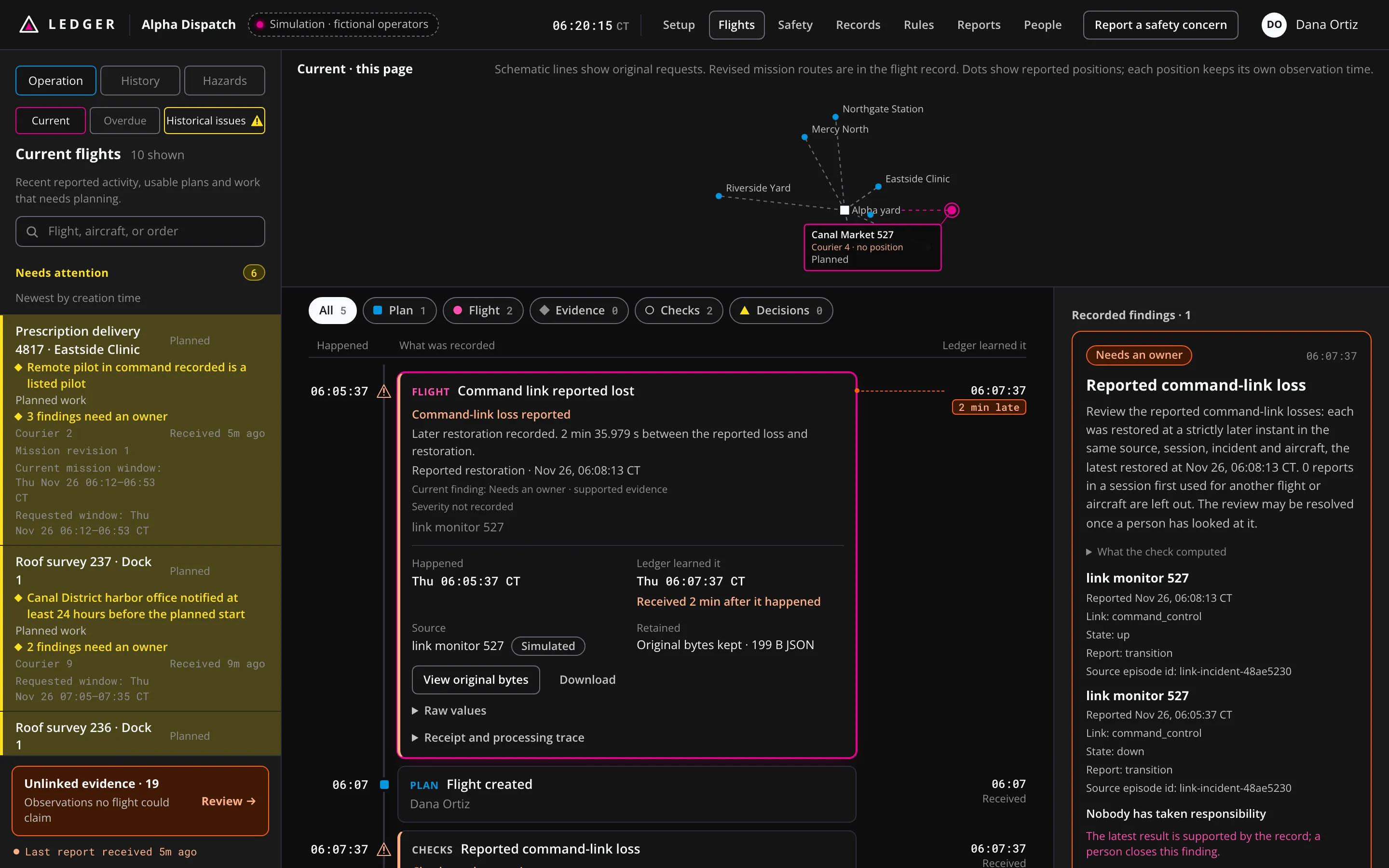
Ledger's flight monitor for the fictional operator Alpha Dispatch. The bar has Setup, Flights, Safety, Records, Rules, Reports and People, Report a safety concern and the account of Dana Ortiz. On the left, current flights, six needing attention. At the top, a schematic map of the operation around Alpha yard. In the middle, a flight's record: a report that the command link was lost happened at 06:05:37 and reached Ledger two minutes late from link monitor 527, with a later restoration recorded and its original bytes kept, 199 bytes of JSON. On the right, the finding it opened, Reported command-link loss, marked Needs an owner: nobody has taken responsibility, and a person closes it.
The flight monitor for Alpha Dispatch, a fictional operator. A lost-link report arrived two minutes late; the finding it opened is waiting for someone to own it. Watch this scene

What “Watch it run” plays

Seven recorded scenes of fictional people using the real application, each one or two minutes. Choose one to start it.

  1. A hazard is identified, assessed and acceptedFictional Valley Power
  2. A procedure is written, signed, issued and acknowledgedFictional Valley Power
  3. A landing report goes missingAlpha Dispatch
  4. A lost control link becomes a hazardAlpha Dispatch
  5. New evidence arrives mid-decisionBeta Inspection
  6. Wind at a dock rises above the adopted limitAlpha Dispatch
  7. One flight checked against today’s rules and proposed onesAlpha Dispatch

Five questions it answers

What an operator, an accountable executive or a regulator will ask.

One operation it is built for: a drone operation that flies under a Part 107 waiver today, often for flights beyond visual line of sight, and is preparing to apply for a certificate under the proposed Part 108. Ledger keeps its records as it already keeps them and checks them now against Part 107, its waiver and, in shadow, the proposed Part 108. A coding agent can do the setup from its spreadsheets and its waiver; each decision stays with a named person.

  1. What needs attention now, and who owns it?

  2. Where do we stand against the rules we operate under, and what is missing?

  3. What did we know when we decided, who decided, and under what authority?

  4. Are our controls in place, and are they working?

  5. What changed since, and what does the record show about it?

Three ways to use it

Run it yourself, or have us run it or build it with you.

Ledger is open source so that a team can take it and make it their own. Lightcone Systems, the company that builds it, also hosts it and builds custom versions with operators.

Or write to team@lightconesystems.com.

What it does

Twenty parts of one system.

Every screenshot is the real application with fictional operators and people, on a local Ledger after the recorded scenes were performed. They show the dark theme but one, which says so. Select one to see it larger.

01Record

One record

Every input and command is appended to a journal that belongs to one organization and is chained by hash. What happened and when Ledger learned it are kept apart, so a late report shows up as late.

  • Per-tenant, hash-chained, append-only journal
  • Original bytes stored beside the normalized values
  • Corrections are new events, never edits
  • Each input gets a receipt once its bytes are stored and its work is queued
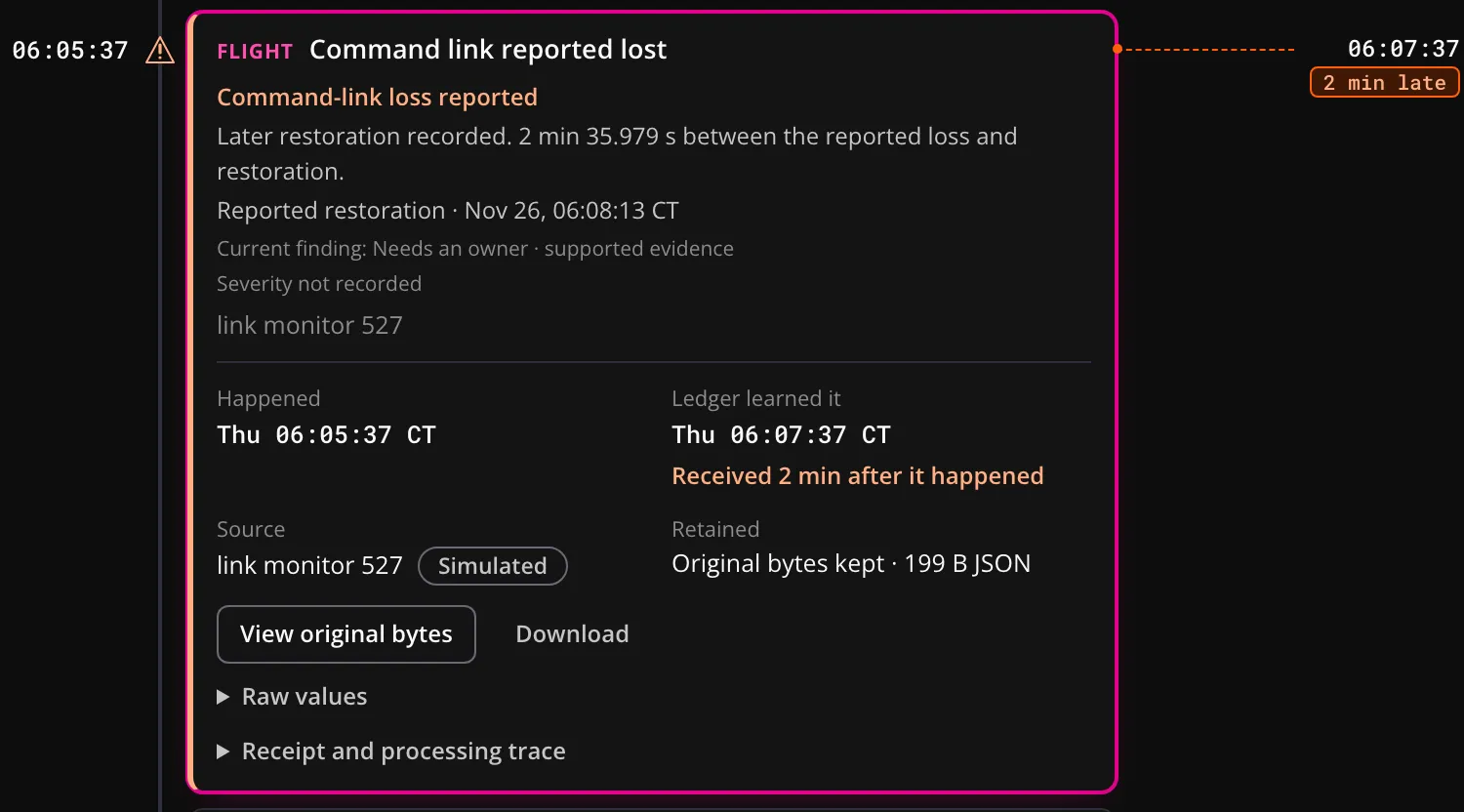
A flight record entry: Command link reported lost. A later restoration is recorded, 2 min 35.979 s after the reported loss, and the finding it opened needs an owner. It happened at 06:05:37 and Ledger learned it at 06:07:37, marked 2 min late and Received 2 min after it happened. Its source is link monitor 527, marked Simulated; original bytes are kept, 199 bytes of JSON, with buttons to view or download them, and the raw values and the receipt and processing trace below.
A lost-link report that reached Ledger two minutes after it happened, with its source and its original bytes. Watch this scene

02Organization

Your own organization

pnpm org:create creates an organization with its name, its time zone and its first administrator on an empty, migrated database, and seeds nothing fictional. The administrator adds people on the People screen and sets what each may do.

  • Every change to a person is recorded with who made it; no one is deleted
  • Every screen shows times in the organization’s own time zone
  • Outside local development, people sign in through any OpenID Connect provider the deployment configures, self-hosted or not, with the authorization code flow and PKCE
  • A signature needs a fresh sign-in at the provider
  • One bar for Flights, Safety, Records, Rules, Reports and People; every screen, and each thing opened on it, has its own address to send a colleague
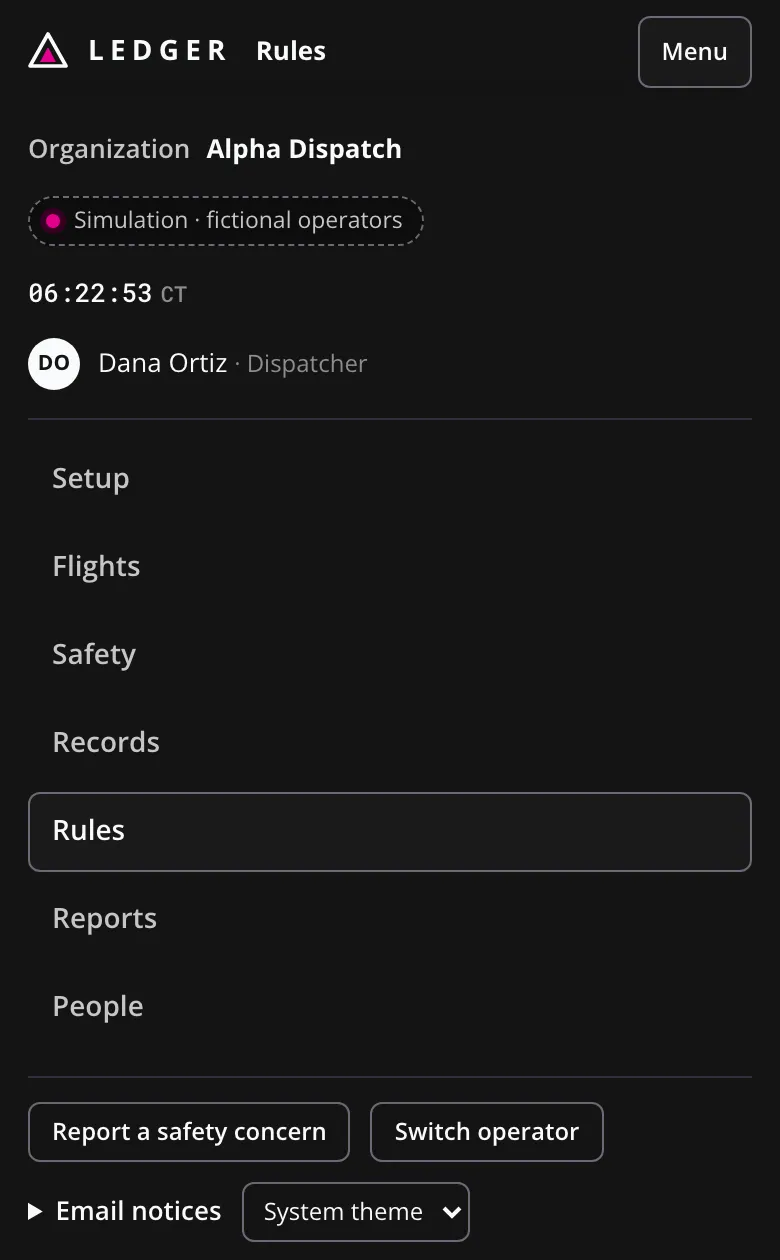
  • A light and a dark theme, following the computer unless a person chooses one; on a phone the bar is one row, with the sections, the account and the theme in its menu
  • A screen printed from the browser comes out light, without the bar or the forms, with the organization, the title and the time of printing at its top
Ledger on a phone, on the Rules screen of the fictional operator Alpha Dispatch. The bar is one row with the Ledger mark, the screen's name, Rules, and a Menu button. The menu is open: the organization, Alpha Dispatch, marked Simulation, fictional operators; the time in CT; the person, Dana Ortiz, Dispatcher; the sections Setup, Flights, Safety, Records, Rules, selected, Reports and People; buttons to report a safety concern and to switch operator; Email notices; and a theme choice set to System theme.
The bar on a phone at Alpha Dispatch, a fictional operator: one row, and its menu open with the sections, the account and the theme.

03Setup

Set up by a coding agent

Set up Ledger with a coding agent is written to the agent an operator asks to do the setup: every command, what it may do alone, and what only a person does. pnpm ledger is a command line over the public API, and pnpm ledger mcp offers its reading commands, checks and imports as tools to an agent that speaks the Model Context Protocol. A new organization opens on Setup, a checklist of what is on file and what is not.

  • Adding people, record types and their columns, checking and importing a file, packs and their rules, preparing an adoption, coverage, open findings grouped by rule, one finding with the evaluations and records behind it, drafting safety records from files, producing records and drafting the recordkeeping plan
  • Over MCP, a tool that would send an adoption, a grant or a decision prepares the command for a person to run, and sends nothing
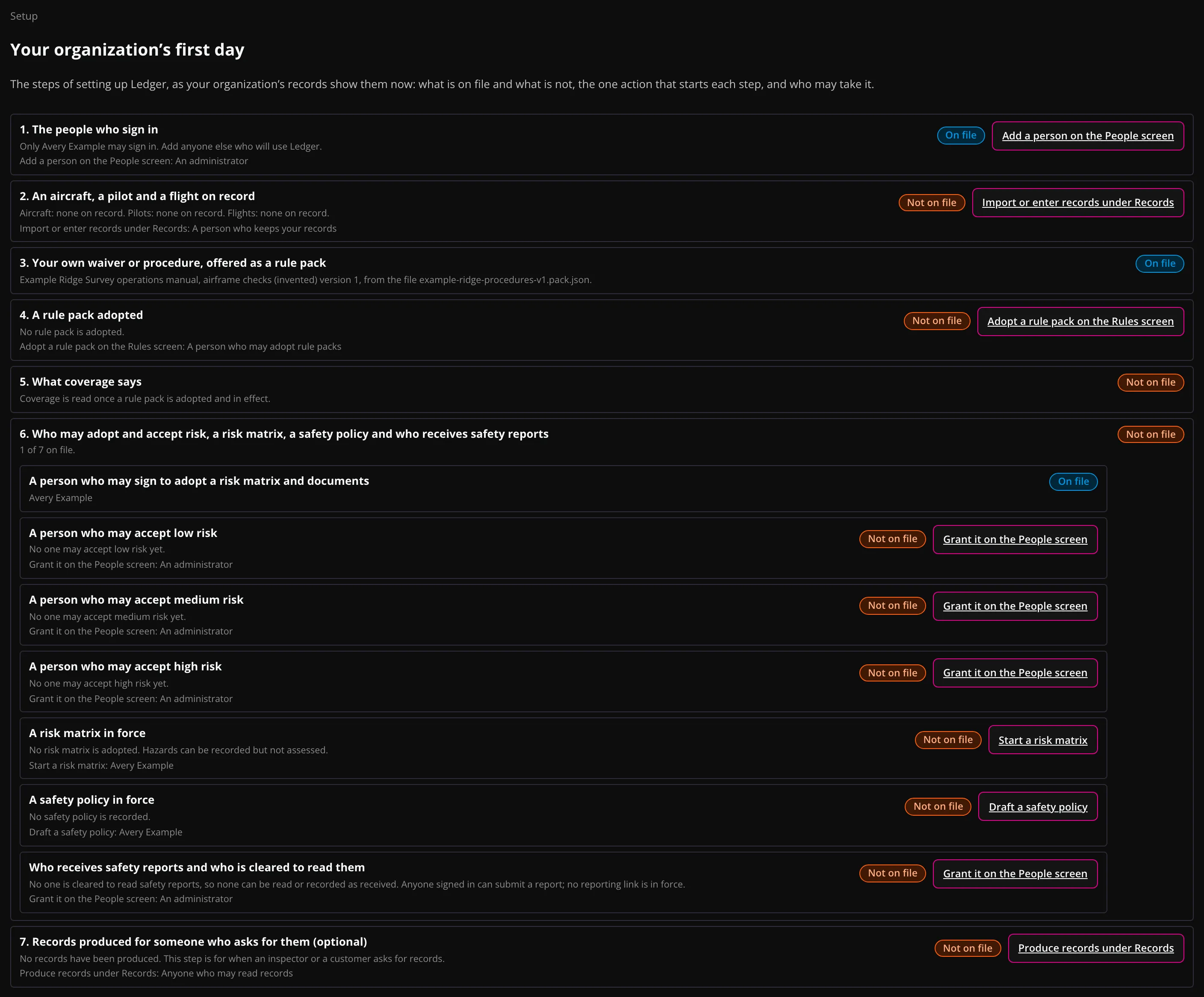
  • Setup lists seven steps, from the people who sign in to the first records produced, each with your own names and ids, the one action that starts it and who may take it. Nothing is ticked by hand: each step reads what is on record.
  • examples/first-operator is the whole path for an invented operator, Example Ridge Survey, from its waiver and its spreadsheets to coverage, with one script
  • The agent works under its own credential, which may import and read
  • An adoption is a person’s decision: the agent prints it, and the person sends it with their own credential and reason. The API refuses an adoption from anything but a person.
  • The operator’s files stay outside the checkout, or in a folder git ignores, and are never committed
The Setup screen of Example Aerial Survey, a new fictional organization, titled Your organization's first day. Seven steps, each with On file or Not on file. 1, the people who sign in: only Avery Example, On file, with Add a person on the People screen. 2, an aircraft, a pilot and a flight on record: none on record, Not on file, with Import or enter records under Records. 3, your own waiver or procedure, offered as a rule pack: an invented Example Ridge Survey operations manual from a pack file, On file. 4, a rule pack adopted: Not on file, with Adopt a rule pack on the Rules screen. 5, what coverage says: Not on file until a pack is adopted. 6, who may adopt and accept risk, a risk matrix, a safety policy and who receives safety reports, 1 of 7 on file, each item with its action, such as Start a risk matrix and Draft a safety policy. 7, records produced for someone who asks for them, optional, Not on file.
Setup, the first screen of a new organization, here the fictional Example Aerial Survey: each step with what is on file and what is not, the one action that starts it and who may take it.

04Rules

Rule packs you adopt

A rule pack is an immutable, versioned set of rules. Each rule keeps the source text it checks, pinned by byte span and SHA-256. A pack does nothing until a person adopts an exact version for a date range.

  • Active adoptions count in what a person attests to. Shadow adoptions record their findings, labelled, and never count.
  • A pack that cites proposed text can only be adopted in shadow
  • 14 CFR Part 107, as in force on January 1, 2026, adoptable as active
  • Part 108 proposed rule, read section by section: the records kept and the record of each flight, duty and rest, the reporting clocks, the operating areas, training, security, equipment and maintenance, what an applicant must submit, and what is on file for a safety management system. A note in the repository lists every paragraph of Subparts A, B, C and E with the rule that reads it or the reason none does. Proposed · shadow only
  • Invented example packs, a waiver among them, for development and the demonstration
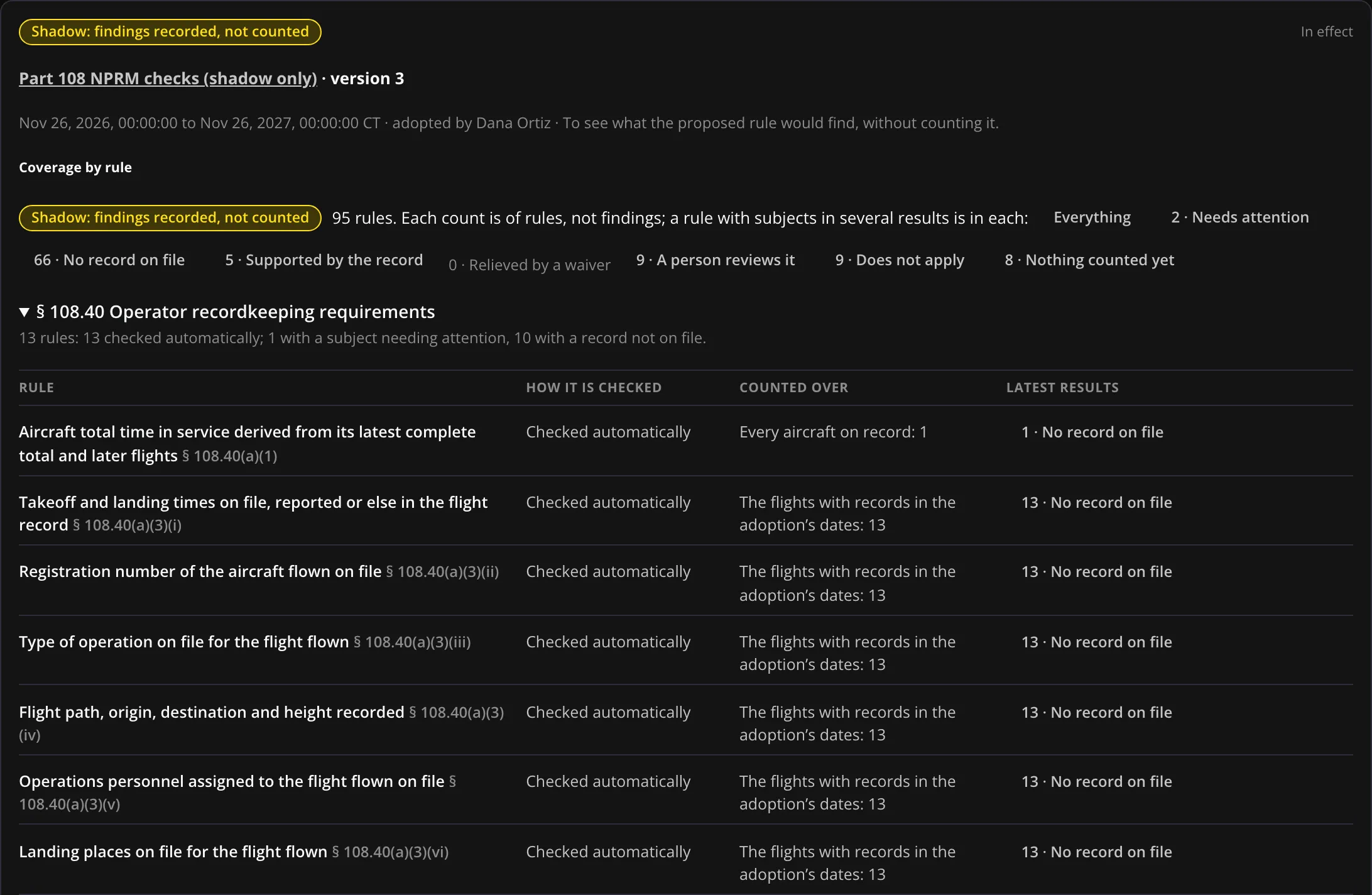
Part of the Rules screen for the fictional operator Alpha Dispatch. Part 108 NPRM checks (shadow only), version 3, labelled Shadow: findings recorded, not counted, adopted by Dana Ortiz to see what the proposed rule would find without counting it. Under Coverage by rule, the pack's 95 rules counted by result, each count a filter: 2 needs attention, 66 no record on file, 5 supported by the record, 9 a person reviews it, 9 does not apply, 8 nothing counted yet. Then the section § 108.40 Operator recordkeeping requirements and a table of its rules, each with the paragraph it reads, such as § 108.40(a)(3)(i), how it is checked, what it is counted over and its latest results, most of them No record on file.
Proposed Part 108 adopted in shadow at Alpha Dispatch, a fictional operator: its version, who adopted it and why, its rules counted by result, and its rules under each section with the paragraph each reads and its latest results. Watch this scene

05Your rules

Your waiver or procedure, as a pack

Keep the text of your waiver or procedure as issued, in a file, and describe its provisions in a short file beside it. With no code, pnpm pack:build finds each quotation, pins it and writes a pack file; set LEDGER_PACKS_DIR and it is offered for adoption.

  • The waiver’s description states its certificate number, its stated dates and which flights its conditions cover
  • Every provision is carried, with its quoted words: as a rule a check runs, one a person checks, or one not supported yet
  • An ordinary Part 107 flight is recorded as one the waiver does not cover, and is not checked against its conditions
  • A provision that grants relief names the rule of another pack it relieves. While the waiver is adopted as active, that rule’s result for a flight flown under the waiver is recorded as relieved, with the provision, instead of opening a finding.
  • The Rules screen says when the waiver’s stated dates end
  • Record types your pack declares. A record no built-in type holds is declared in the pack file, as data: its fields, units, options and what it is about. Once the pack is adopted it has an import file, an entry form, browse, production and checks, as a built-in type does, and other organizations do not see it. A pack cannot yet add a field to a built-in type.
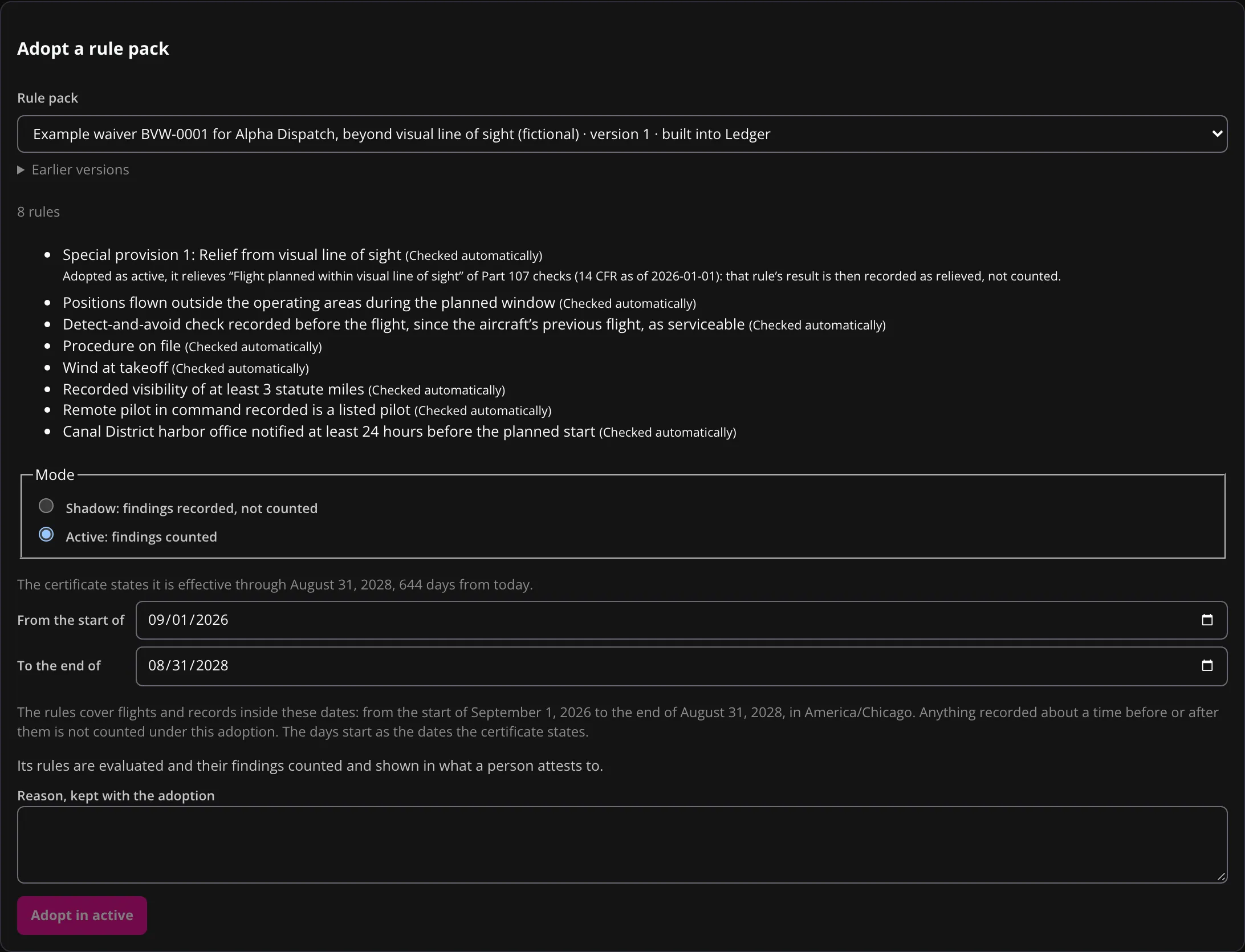
The Adopt a rule pack form with Example waiver BVW-0001 for Alpha Dispatch, beyond visual line of sight (fictional), version 1, chosen. It lists the pack's 8 rules, each checked automatically; under Special provision 1, Relief from visual line of sight, it says that adopted as active it relieves Flight planned within visual line of sight of the Part 107 checks, whose result is then recorded as relieved, not counted. Mode is set to Active: findings counted. The form says the certificate states it is effective through August 31, 2028, with the dates filled from the start of September 1, 2026 to the end of August 31, 2028, in America/Chicago, a field for the reason, and an Adopt in active button.
Adopting a fictional waiver for Alpha Dispatch: every provision is listed with how it is checked, the first names the Part 107 rule it relieves, and the dates start as the certificate states them.
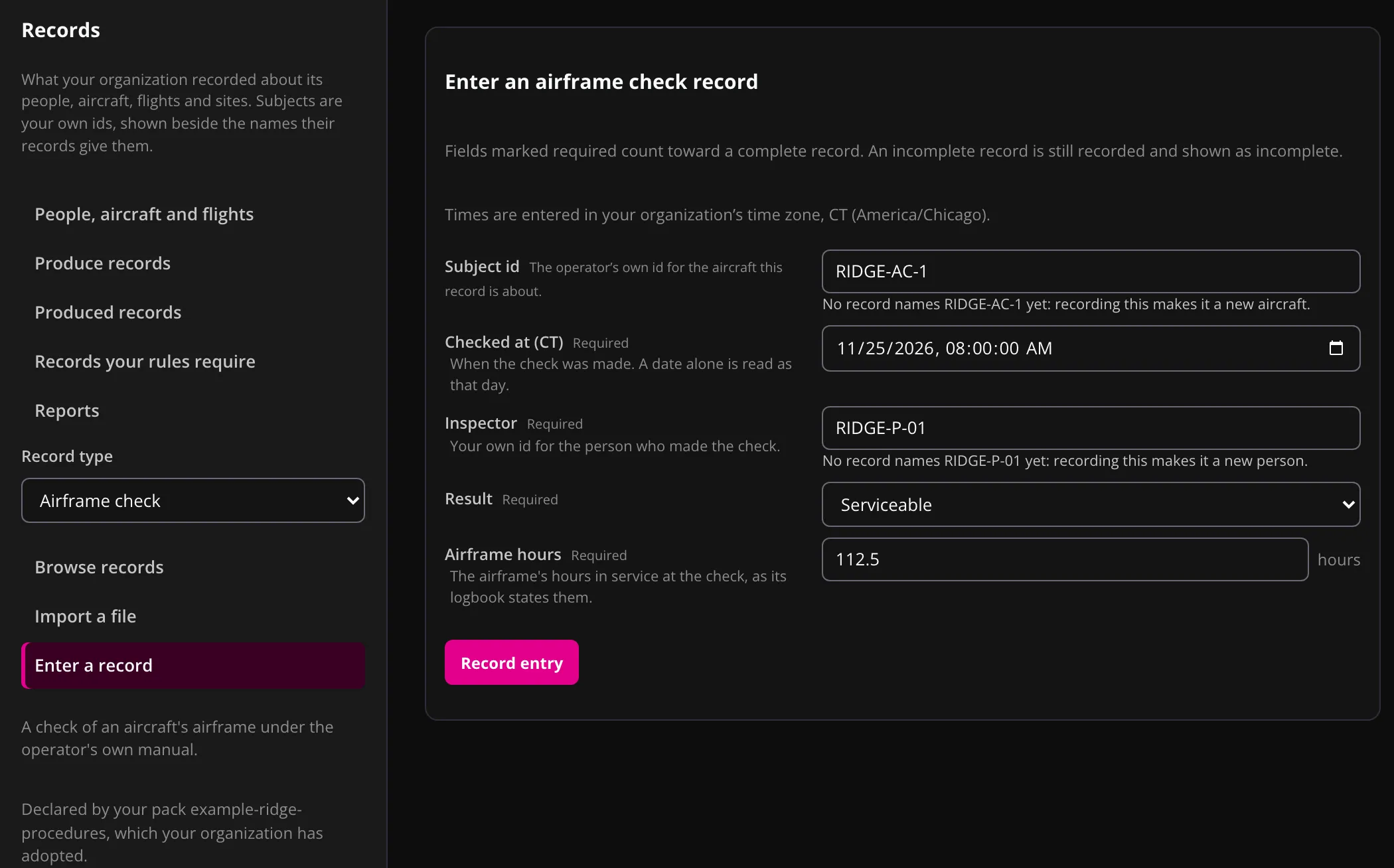
The Records screen of the fictional operator Alpha Dispatch with the record type Airframe check chosen; the side says it is a check of an aircraft's airframe under the operator's own manual, declared by your pack example-ridge-procedures, which your organization has adopted. The form Enter an airframe check record: Subject id RIDGE-AC-1, with the note that no record names it yet and recording this makes it a new aircraft; Checked at, in CT, 11/25/2026 08:00; Inspector RIDGE-P-01; Result, Serviceable; Airframe hours 112.5 hours; and a Record entry button.
The entry form of a record type an invented pack declares, Airframe check, at Alpha Dispatch, a fictional operator: its fields, units and options come from the pack file.

06Checks

Deterministic checks

Rule checks are ordinary code over retained records. The same inputs give the same result, and a finding shows the numbers it was computed from. For each adopted pack, coverage lists every rule under the pack’s sections, with the paragraph it reads beside it, how it is checked, who it covers and the latest result for each.

  • Each evaluation names the rule version and the digest of its inputs
  • A missing record is shown, not silent: for the remote pilot certificate rule, “No record on file” is a count you can open
  • A plan is checked when it is recorded, not when the flight starts; once a flight record says what was flown, a rule that can reads it instead and says which it read
  • A result states times in the organization’s time zone and a value in the unit the rule’s text uses, with the stored value beside it
  • Nothing in the codebase calls a language model
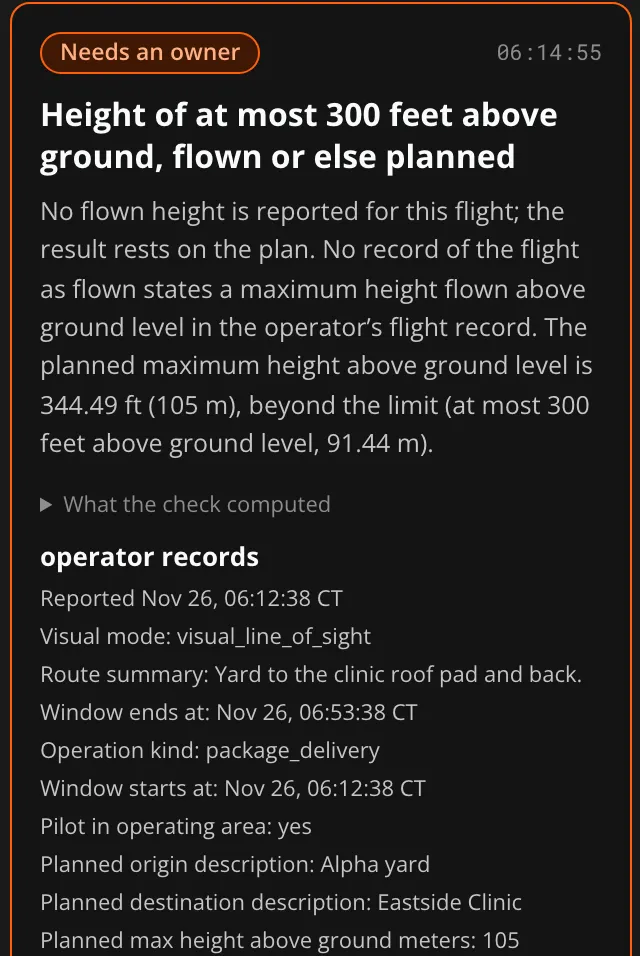
A finding titled Height of at most 300 feet above ground, flown or else planned, marked Needs an owner. It says no flown height is reported for this flight, so the result rests on the plan: no record of the flight as flown states a maximum height, and the planned maximum height above ground level is 344.49 ft (105 m), beyond the limit of at most 300 feet, 91.44 m. Below, the operator records it read, with their fields by label.
A finding that says what it rests on, the plan, with its numbers and the operator record it read. Watch this scene
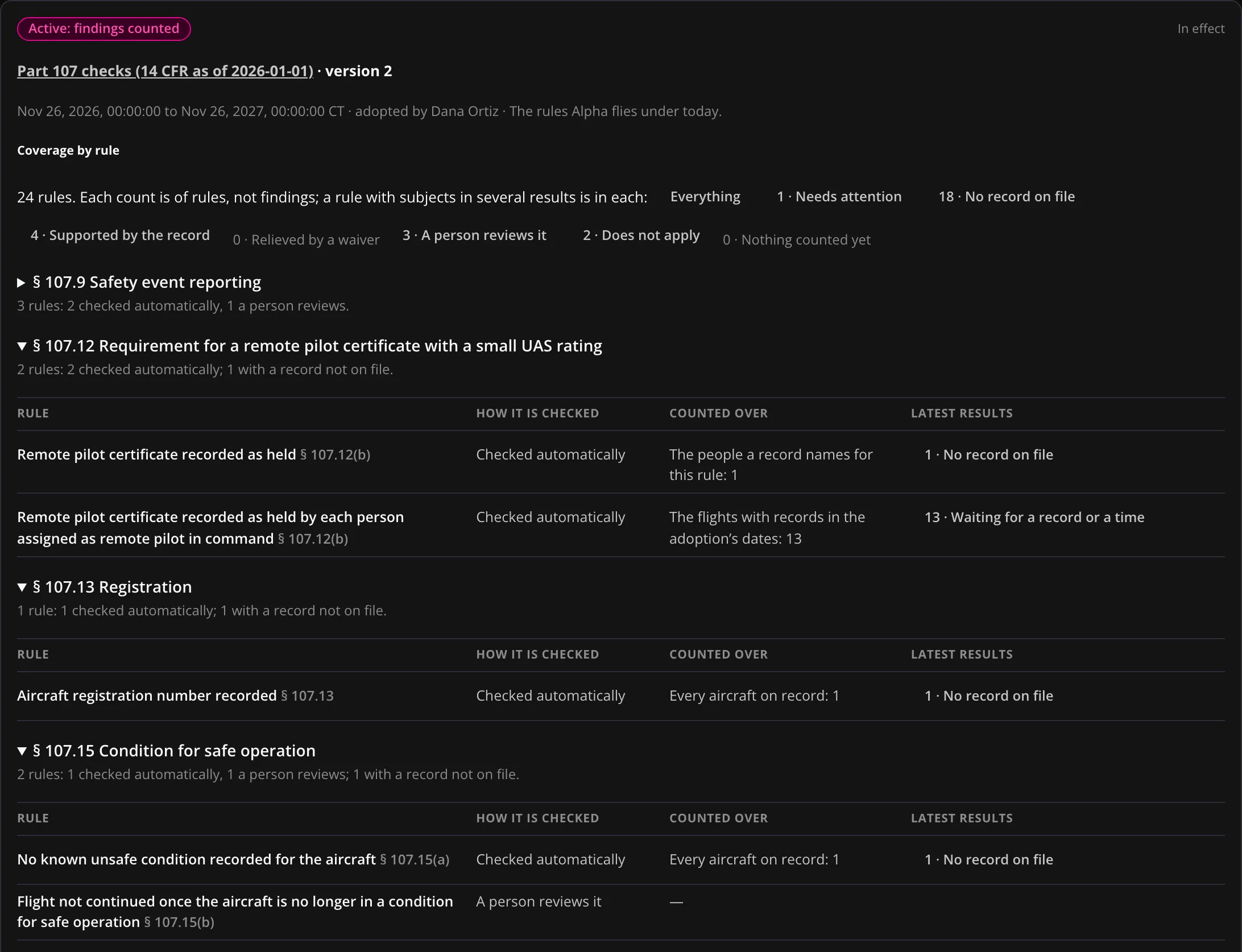
Part 107 checks (14 CFR as of 2026-01-01), version 2, labelled Active: findings counted, adopted by Dana Ortiz for Alpha Dispatch. Coverage by rule opens with its 24 rules counted by result, each count a filter: 1 needs attention, 18 no record on file, 4 supported by the record, 0 relieved by a waiver, 3 a person reviews it, 2 does not apply. Then the sections: § 107.9 Safety event reporting folded, 3 rules; § 107.12 with Remote pilot certificate recorded as held, § 107.12(b), over the people a record names for this rule, 1 No record on file, and the same for each person assigned as remote pilot in command over the 13 flights, 13 Waiting for a record or a time; § 107.13 Registration, 1 No record on file; § 107.15 Condition for safe operation, one rule checked automatically and one a person reviews.
Coverage for Part 107 at Alpha Dispatch, a fictional operator: its rules counted by result, then section by section each rule with the paragraph it reads, how it is checked, who it covers and its latest results, including records not on file. Watch this scene

07Findings

Findings a person works

A finding about a flight, a pilot, an aircraft or the organization is taken or assigned, given an action with a due date, and closed by a person with a reason. One list shows every open finding with its age and its owner.

  • A record a person keeps closes a finding by itself when it answers it, and says which record
  • A measurement that returns inside its limit does not: what the finding reported still happened, and a person closes it
  • An action past its due day with nothing done is shown as overdue
  • Findings of a pack adopted in shadow are listed apart, labelled as proposed, and never counted
  • A hazard can be opened from a finding, keeping it as its origin
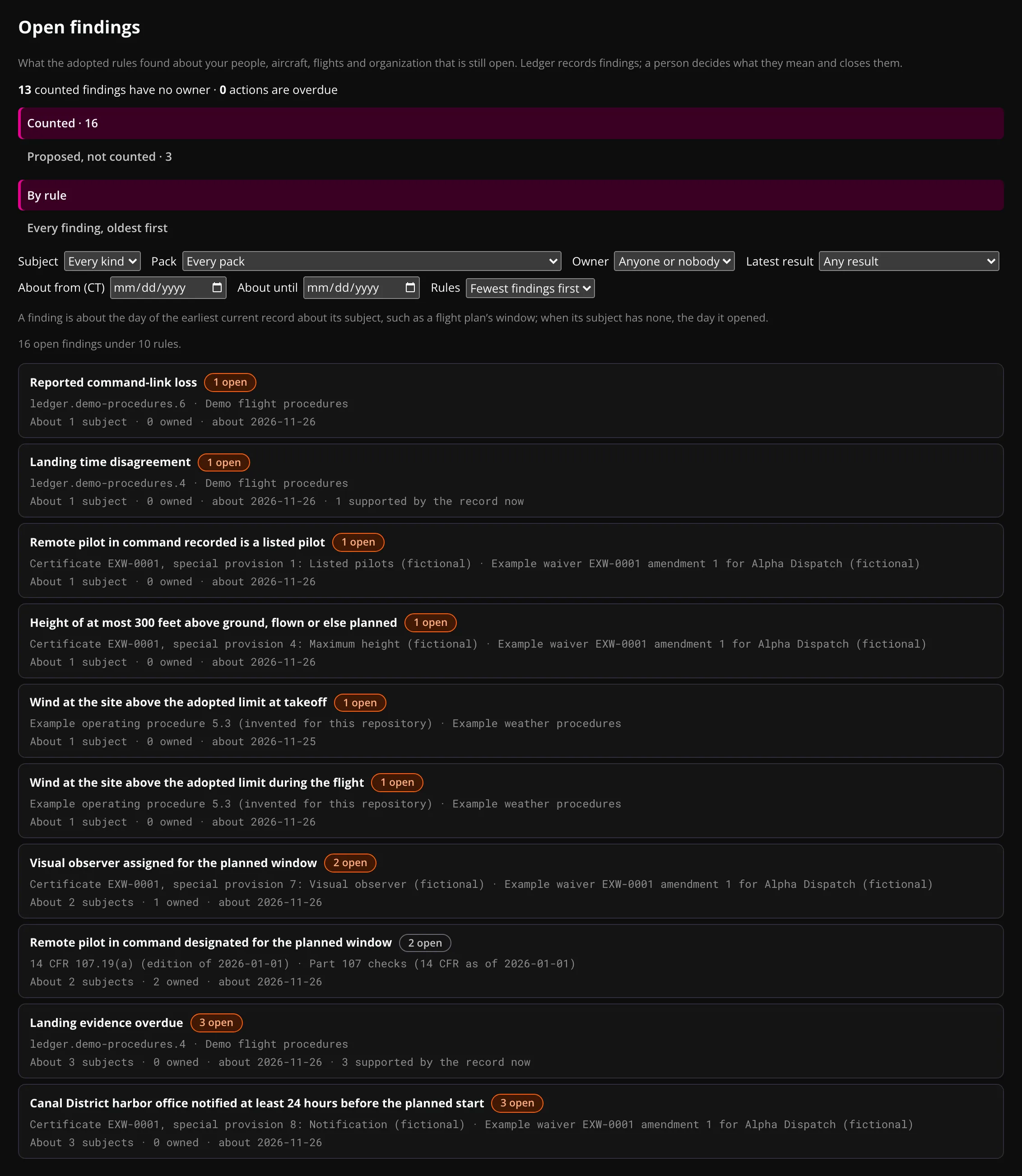
The Open findings list for Alpha Dispatch: 13 counted findings have no owner, 0 actions are overdue. Tabs for Counted, 16, and Proposed, not counted, 3; a choice between By rule, selected, and Every finding, oldest first; filters for subject, pack, owner, latest result and dates, and rules ordered fewest findings first. 16 open findings under 10 rules, each a row with its rule, its paragraph and pack, and its count: Reported command-link loss, Landing time disagreement, Remote pilot in command recorded is a listed pilot, Height of at most 300 feet above ground, flown or else planned, Wind at the site above the adopted limit at takeoff, and Wind at the site above the adopted limit during the flight, 1 open each; Visual observer assigned for the planned window, 2 open, 1 owned; Remote pilot in command designated for the planned window, 2 open, 2 owned; Landing evidence overdue, 3 open; Canal District harbor office notified at least 24 hours before the planned start, 3 open.
Open findings at Alpha Dispatch, a fictional operator, grouped by rule with the rarest first: each rule with how many are open, about how many subjects, how many are owned and the day they are about. Proposed findings are on their own tab.
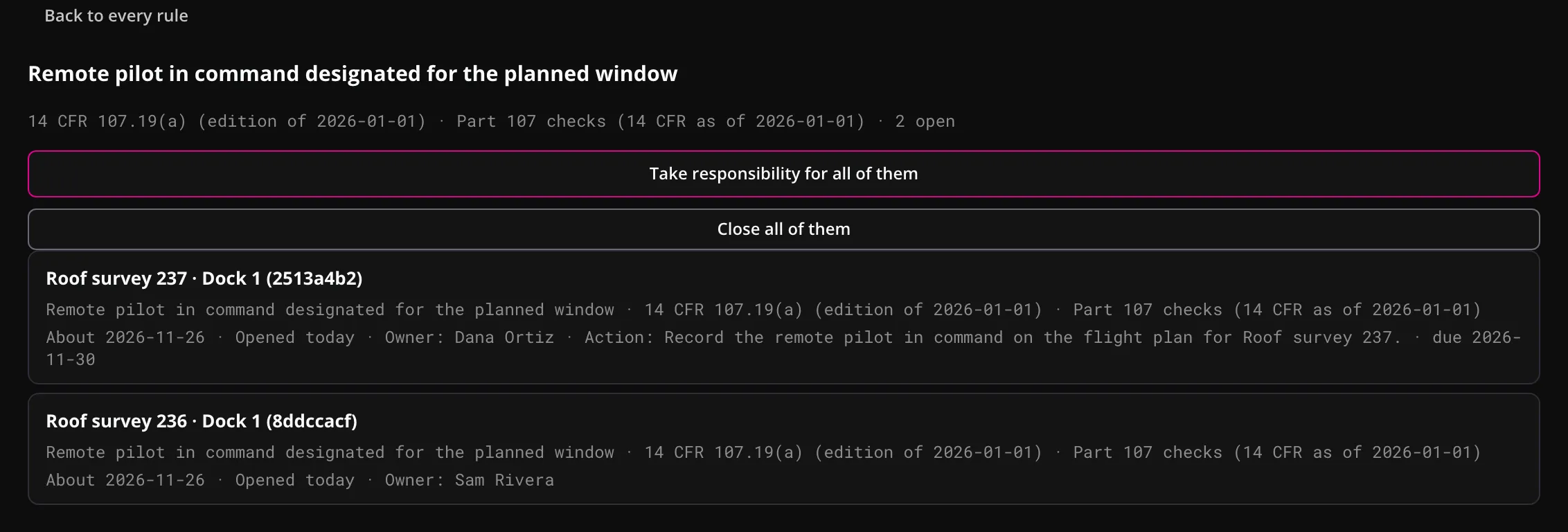
The rule Remote pilot in command designated for the planned window, opened from the Open findings list: 14 CFR 107.19(a), Part 107 checks, 2 open, with a Back to every rule link. Two buttons, Take responsibility for all of them and Close all of them. Below, its two findings: Roof survey 237, owner Dana Ortiz, with the action Record the remote pilot in command on the flight plan for Roof survey 237, due 2026-11-30; and Roof survey 236, owner Sam Rivera.
One rule opened from that list: both of its findings, each about a flight, with its owner and action, and one decision to take responsibility for all of them or to close all of them.
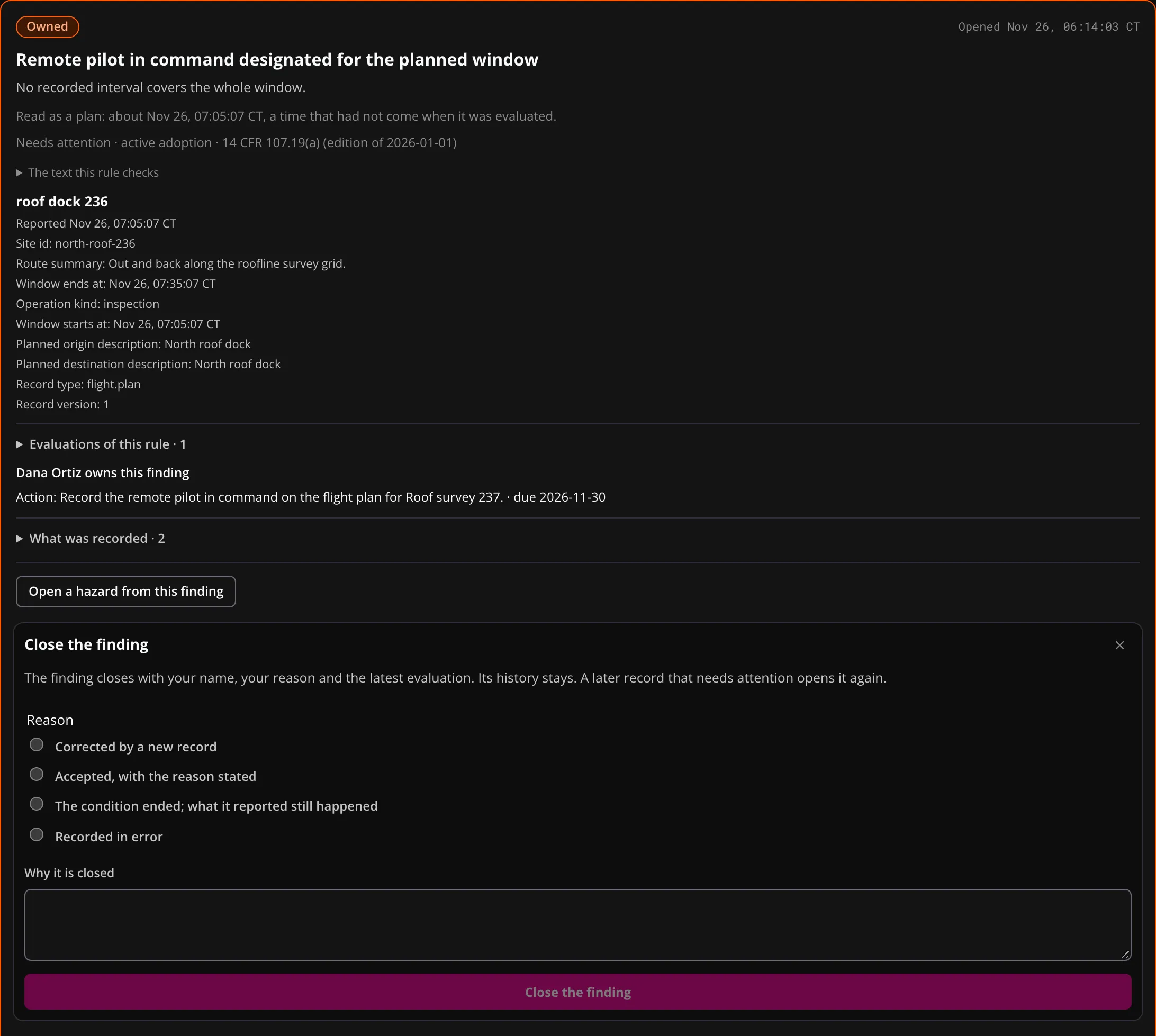
A finding titled Remote pilot in command designated for the planned window, marked Owned: no recorded interval covers the whole window, read as a plan, under 14 CFR 107.19(a). Below, the flight plan record it read, then Dana Ortiz owns this finding and the action Record the remote pilot in command on the flight plan for Roof survey 237, due 2026-11-30. The Close the finding form is open: it says the finding closes with your name, your reason and the latest evaluation, its history stays, and a later record that needs attention opens it again. Reasons: Corrected by a new record; Accepted, with the reason stated; The condition ended, what it reported still happened; Recorded in error. A field for why it is closed and a Close the finding button.
One finding opened: Dana Ortiz owns it, its action has a due day, and closing it asks for one of four reasons and why.

08Notices

Notices by email and webhook

A person is told by email when a finding or an action is assigned to them, when an action of theirs is due within three days or overdue, and when a document waits for their acknowledgement, with a daily or weekly digest if they ask. An organization can have the same posted to its own signed webhook.

  • Both are off until configured
  • Every notice and every attempt to send it is on record, on a list the administrator reads
  • A safety report or a restricted record is named by its reference and a link only
  • Each person chooses, in their account, which notices arrive by email
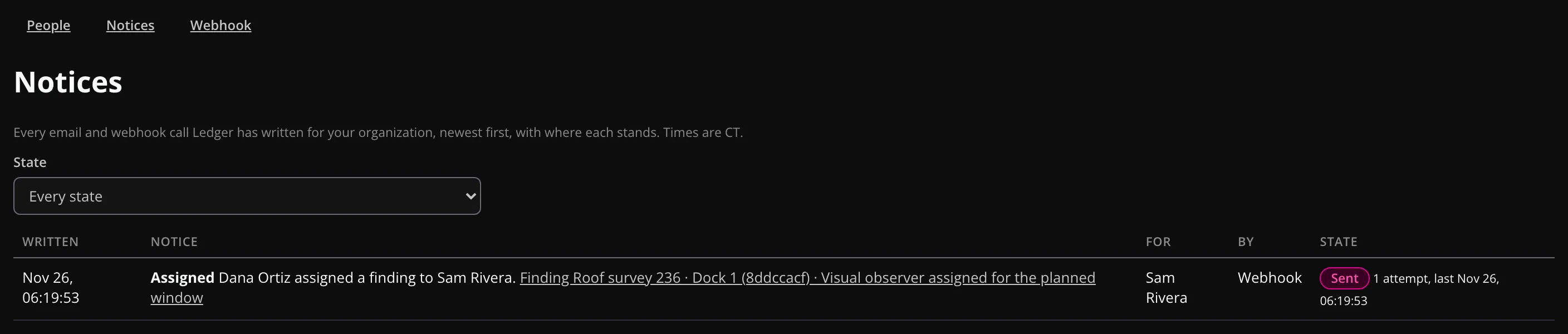
The Notices list of Alpha Dispatch, which says it holds every email and webhook call Ledger has written for the organization, newest first, with where each stands, times in CT, and a State filter set to Every state. One row: written Nov 26, 06:19:53; Assigned: Dana Ortiz assigned a finding to Sam Rivera, with a link to the finding about Roof survey 236 under Visual observer assigned for the planned window; for Sam Rivera; by Webhook; Sent, 1 attempt.
The administrator’s list of notices at Alpha Dispatch, a fictional operator: a finding assigned to a person, posted to the organization’s webhook, with its state and attempts.

09Decisions

People attest; Ledger records

Ledger never says “compliant” or “go”. A check reports what the evidence supports. A named person with the authority makes each judgment, and the decision keeps the view they saw.

  • A signature binds the re-authenticated person, their authority at that moment, and the digest of the exact content
  • If the record changed between display and commit, the decision is refused and the person looks again
  • Picking a person grants no permissions; actions come from their current authority
The Sign risk acceptance screen for Morgan Ellis, the fictional accountable executive, marked Exact content. It says the signature binds to exactly what is shown. It lists the hazard Link loss near energized line at Tower 83, its initial and predicted residual risk, both High, the control relied on, and the intent statement. A side panel has the box for confirming the content was reviewed, ticked, a rationale, and the fixture credential to enter again, with a Confirm it's you button before Sign and accept risk.
Signing a risk acceptance: the exact statement, the content it binds to, and a fresh confirmation of identity. Watch this scene

10On request

Records for an inspector

Each pilot, aircraft and flight has a file of everything on record about it. When an inspector asks, a person produces the records by subject, type and date as one .zip, and says why and who asked. An inspector can also look for themselves, and change nothing.

  • A reader. Signed in from the Reader preset, an inspector opens records, coverage, findings and controlled documents, and is offered nothing they cannot do
  • A link to one produced set. It needs no sign-in, expires, is revoked at once, and keeps each time it was opened, without the visitor’s address
  • A readable index that opens in any browser and prints
  • A CSV per record type, with when and by whom each record was recorded and what replaced it
  • A manifest with the SHA-256 of every file, which anyone verifies offline with Node alone
  • Producing records is itself recorded, with the reason and who asked
  • Safety reports and restricted attachments are never included
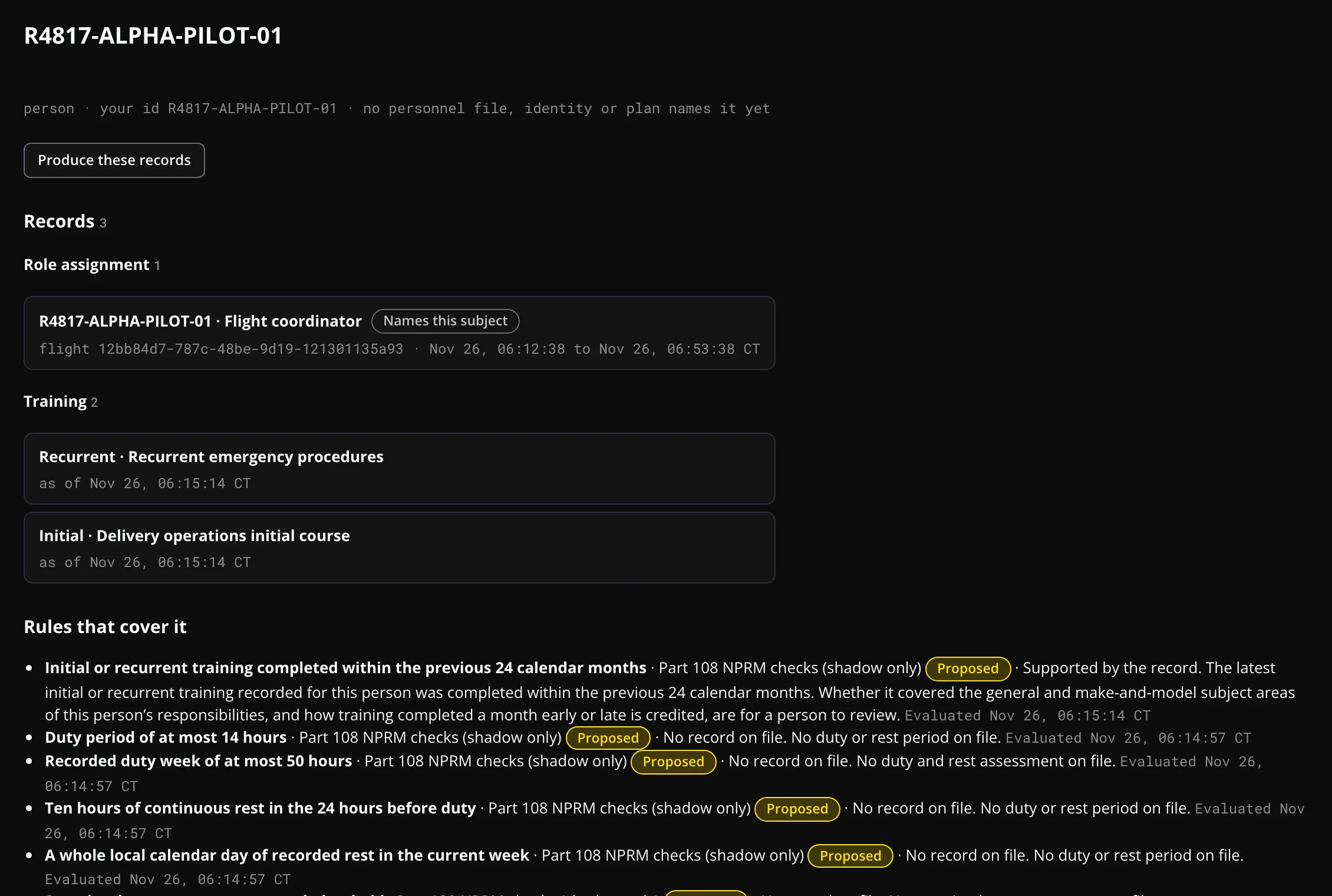
The file of the fictional pilot R4817-ALPHA-PILOT-01: a person, with no personnel file, identity or plan naming them yet, and a Produce these records button. Records 3: a role assignment as flight coordinator on one flight, and two training records, Recurrent emergency procedures and Delivery operations initial course. Rules that cover it, each as its title, its pack and its result, the Part 108 NPRM checks (shadow only) rules marked Proposed: Initial or recurrent training completed within the previous 24 calendar months, Supported by the record; Duty period of at most 14 hours, Recorded duty week of at most 50 hours, Ten hours of continuous rest in the 24 hours before duty and A whole local calendar day of recorded rest in the current week, each No record on file.
A pilot’s file at Alpha Dispatch, a fictional operator: the records about this person by type, and each rule that covers them with its latest result, the proposed ones labelled.
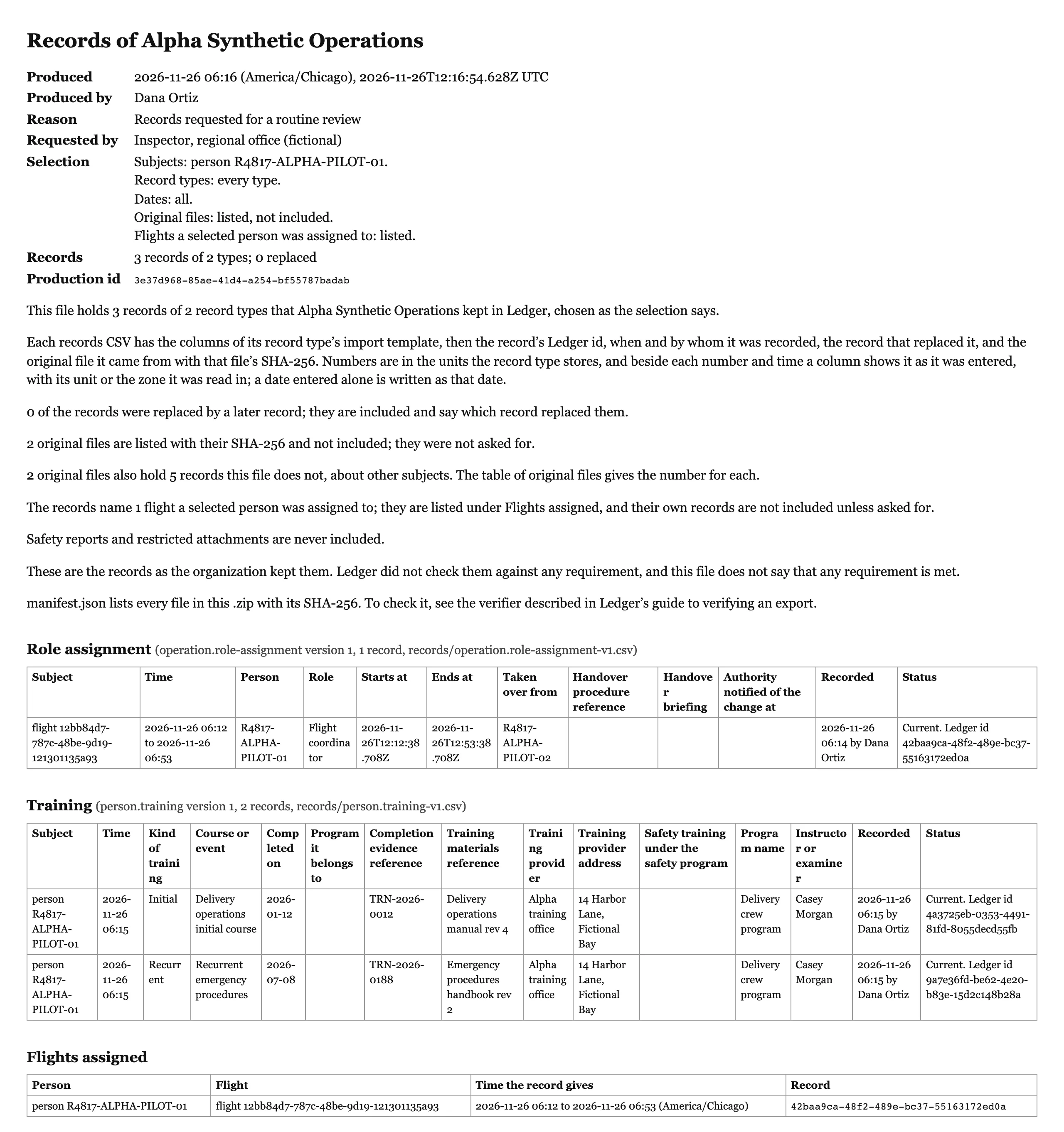
A plain printable page titled Records of Alpha Synthetic Operations. Produced 2026-11-26 06:16 America/Chicago by Dana Ortiz; reason Records requested for a routine review; requested by Inspector, regional office (fictional); selection person R4817-ALPHA-PILOT-01, every type, all dates, original files listed, not included, flights a selected person was assigned to listed; 3 records of 2 types, 0 replaced. Notes say each CSV has its import template's columns and, beside each number and time, a column showing it as it was entered; that the records name 1 flight the person was assigned to, listed under Flights assigned; that safety reports and restricted attachments are never included; that Ledger did not check the records against any requirement; and that manifest.json lists every file with its SHA-256. Then a Role assignment table and a Training table with each record's fields, when and by whom it was recorded, and its Ledger id, and a Flights assigned table naming the flight, the time the record gives and the record.
The index.html inside records produced for that pilot, opened in a browser: who produced them, why and who asked, each record type as a table, then the flight the pilot was assigned to.
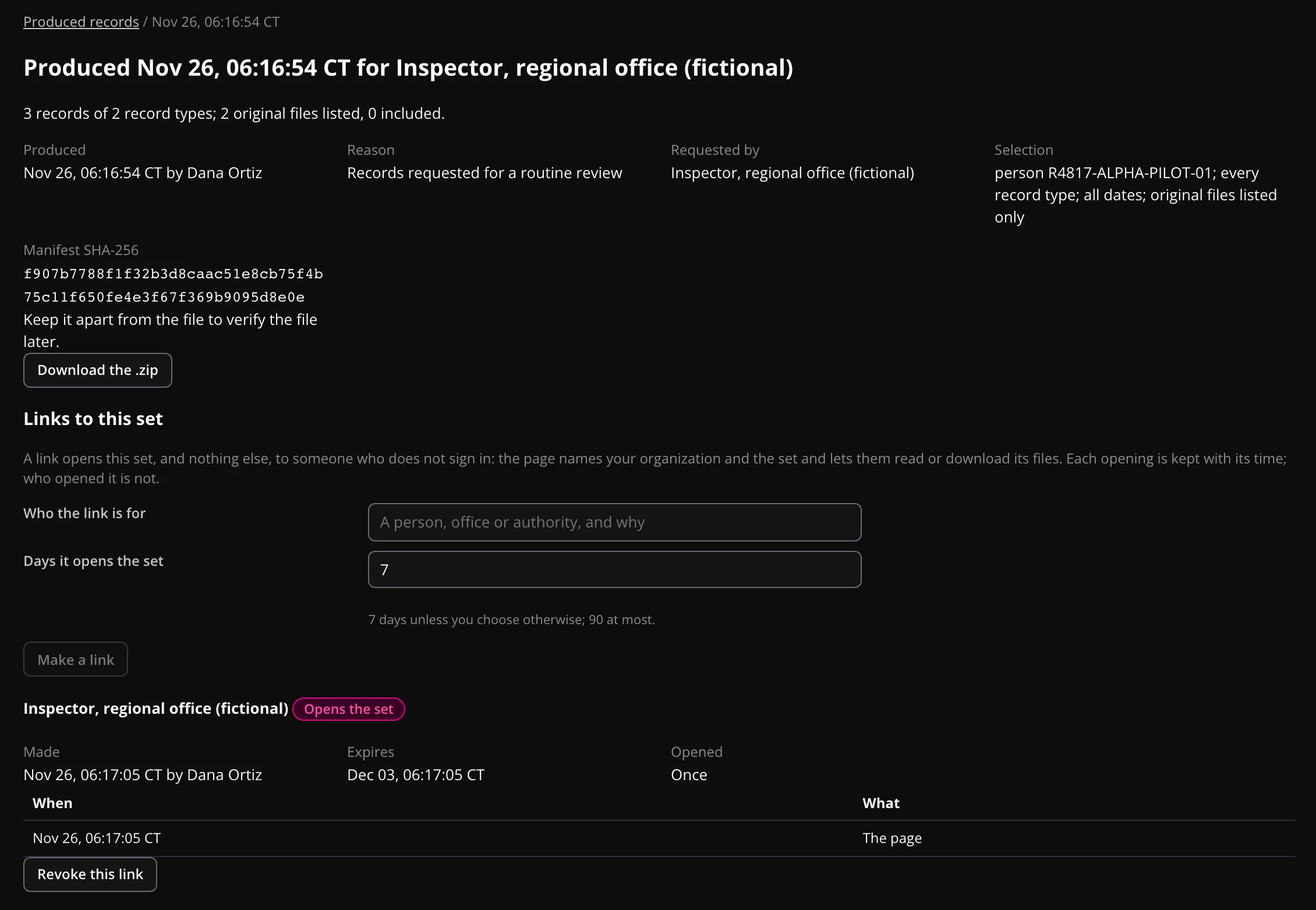
A produced set at Alpha Dispatch: Produced Nov 26, 06:16:54 CT for Inspector, regional office (fictional), 3 records of 2 record types, who produced it, the reason Records requested for a routine review, the selection, the manifest SHA-256 to keep apart from the file, and Download the .zip. Under Links to this set, it says a link opens this set and nothing else to someone who does not sign in, and that each opening is kept with its time, not who opened it; a form to make a link with who it is for and the days it opens the set, 7 by default and 90 at most. One link, for Inspector, regional office (fictional), marked Opens the set: made Nov 26, 06:17:05 CT by Dana Ortiz, expires Dec 03, opened once, with a table of each opening and its time.
The same set in Ledger, with a link made for the fictional inspector: when it was made, when it expires, and each time it was opened.
A page headed Records shared by Alpha Synthetic Operations. It says the organization produced these records from what it kept in Ledger and shared them through a link, that Ledger did not check them against any requirement, and that the page changes nothing and opens until Dec 03 unless the link is revoked sooner. Why they were produced, Records requested for a routine review; asked for by Inspector, regional office (fictional); produced Nov 26, 06:16:54 CT by Dana Ortiz; 3 records; the SHA-256 of the .zip and of manifest.json, to compare with the digest the organization gave by another route. A Download the whole .zip button, then a Files table: index.html, two records CSV files and manifest.json, each with what it is, its size, its SHA-256 and links to read or download it.
The page that link opens, with no sign-in: who shared the records, why and for whom, the digests, and each file to read or download.

11Retention

The recordkeeping plan

Each adopted pack lists the records its text requires, with the retention the text states in its own words, beside how many are on file. From that list a person starts a recordkeeping plan as a controlled document, completes its blanks, has it signed and issues it.

  • The blanks are the operator’s: who is responsible, where the deployment runs, how it is backed up, and for how long it undertakes to keep the records
  • Review and issue are refused while a blank remains
  • Ledger removes no record and computes no retention period. Keeping the deployment and its backups is the operator’s.
  • Which Ledger record holds each record the proposed § 108.40 lists is Ledger’s reading, set out in a note. Read it against your own operation before you rely on a plan drafted from it. Proposed
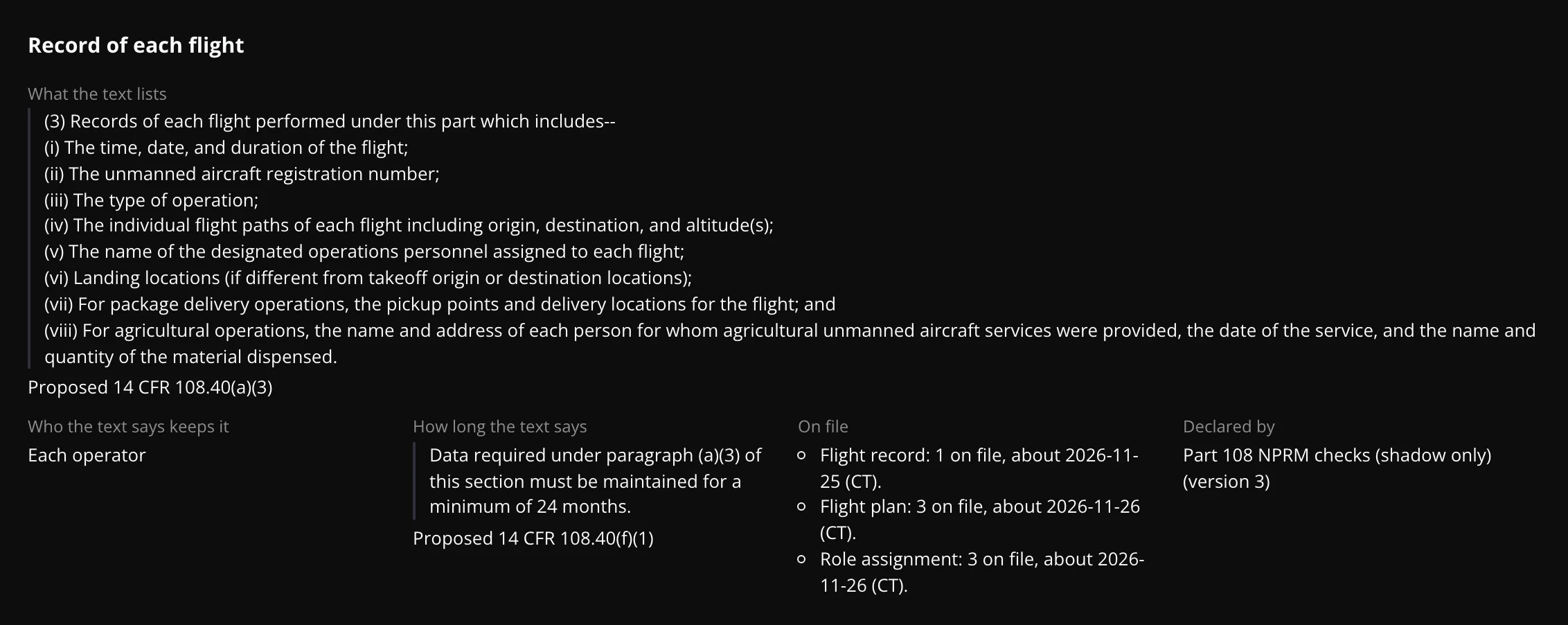
One entry of Records your rules require: Record of each flight. What the text lists, quoted from proposed 14 CFR 108.40(a)(3): records of each flight with its time, date and duration, registration number, type of operation, flight paths, operations personnel, landing locations, and for package delivery and agricultural operations their details. Who the text says keeps it: each operator. How long the text says, quoted from proposed 108.40(f)(1): a minimum of 24 months. On file: flight record, none on file; flight plan, 3 on file; role assignment, 3 on file. Declared by Part 108 NPRM checks (shadow only), version 3.
Records your rules require at Alpha Dispatch, a fictional operator: the record of each flight that proposed Part 108 lists, quoted, with who keeps it, how long the text says, and what is on file.
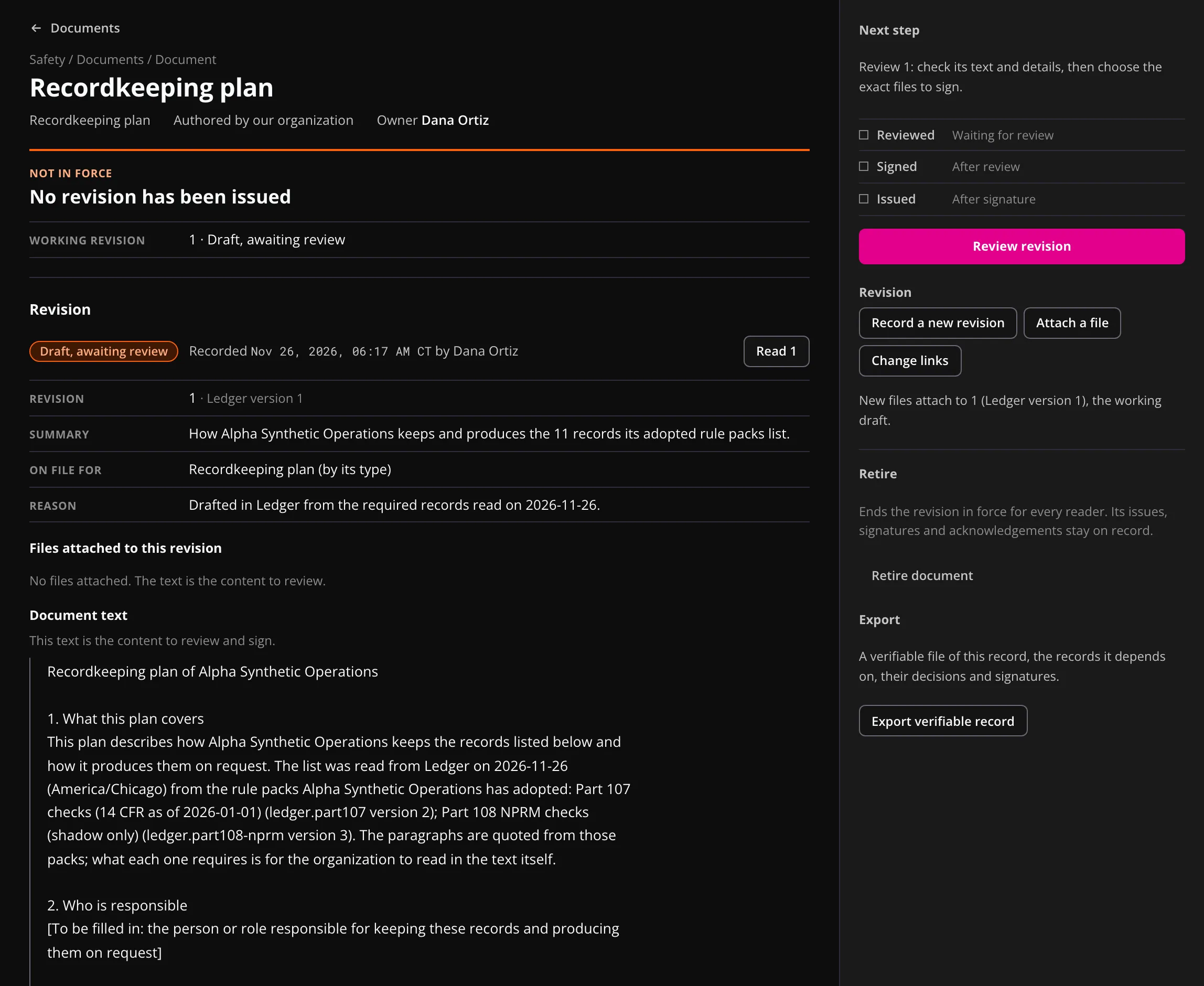
The Recordkeeping plan document, owner Dana Ortiz: not in force, no revision has been issued; working revision 1, Draft, awaiting review, drafted in Ledger from the required records read on 2026-11-26, summarizing how the organization keeps and produces the 11 records its adopted rule packs list. The document text begins Recordkeeping plan of Alpha Synthetic Operations, says what the plan covers and which packs it was read from, and under Who is responsible leaves a blank: To be filled in: the person or role responsible for keeping these records and producing them on request. A side panel lists Reviewed, Signed and Issued, each not done yet, and a Review revision button.
A recordkeeping plan drafted from that list at Alpha Dispatch, a fictional operator: a controlled document not yet in force, with its blanks to fill before review, signature and issue.

12Reports

Reports to print or save

A summary of a period: flights and flight time from the flight records on file, findings by rule (opened, closed, open at the end), actions open and overdue, and hazards by level, each number linked to the list it counts. Findings opened and closed per month by rule, an indicator’s recorded results over time, and one flight’s file as a page.

  • A chart is drawn in the theme and told in a sentence, with its numbers in a table
  • A part a person may not read is named as not theirs, never shown as zero
  • No score and no rating
  • A finding is counted by its current state: one closed in a period and opened again later counts as open
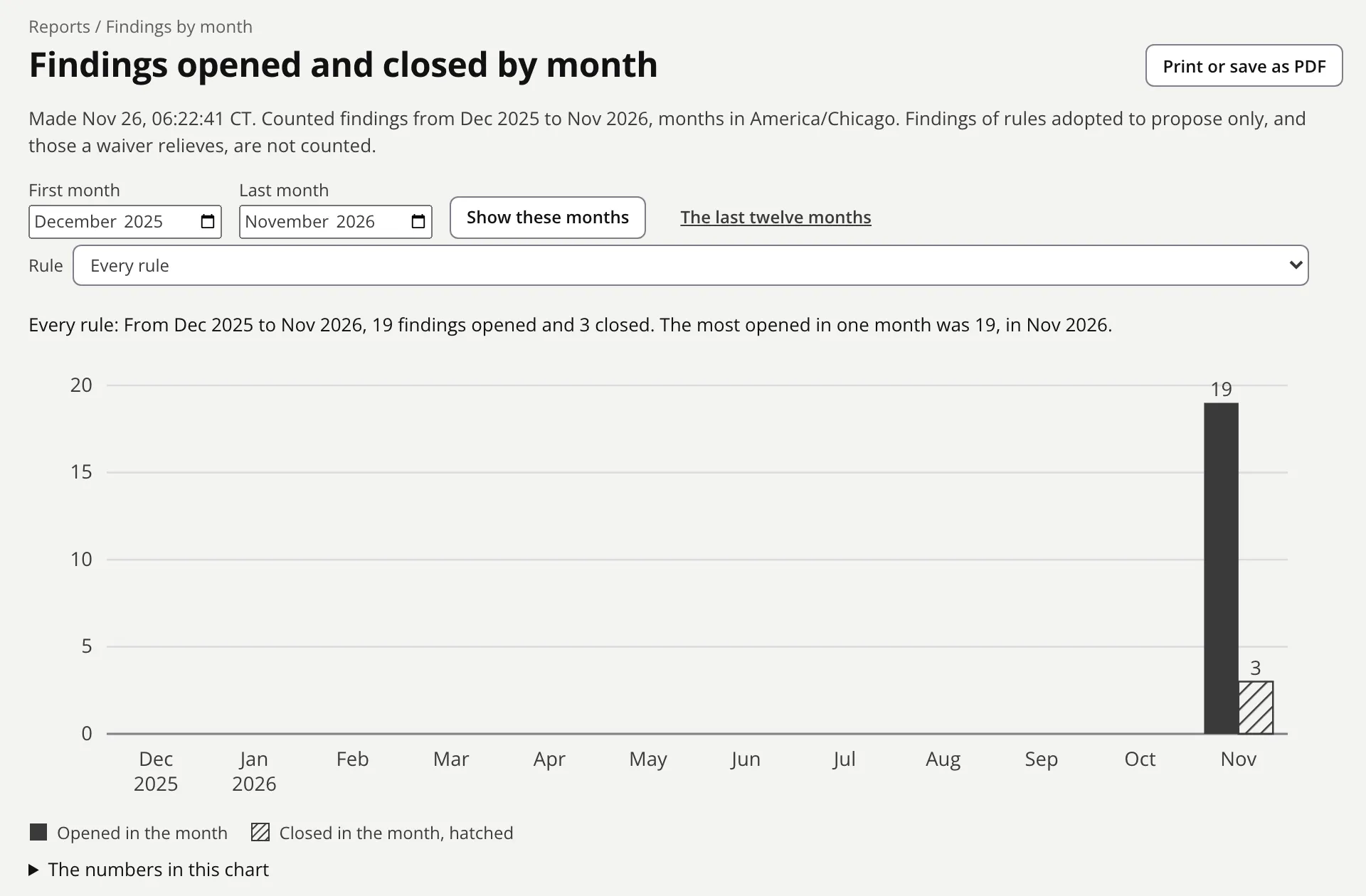
The Findings opened and closed by month report of Alpha Dispatch, shown in the light theme, with a Print or save as PDF button. It says when it was made, that it counts findings from Dec 2025 to Nov 2026 in America/Chicago, and that findings of rules adopted to propose only, and those a waiver relieves, are not counted. Fields for the first and last month and a rule, set to Every rule. A sentence: from Dec 2025 to Nov 2026, 19 findings opened and 3 closed; the most opened in one month was 19, in Nov 2026. A bar chart by month with one solid bar of 19 opened and one hatched bar of 3 closed in November, a legend, and The numbers in this chart to open as a table.
Findings opened and closed by month at Alpha Dispatch, a fictional operator, in the light theme: the chart is told in a sentence above it. The organization’s records here are one day old.
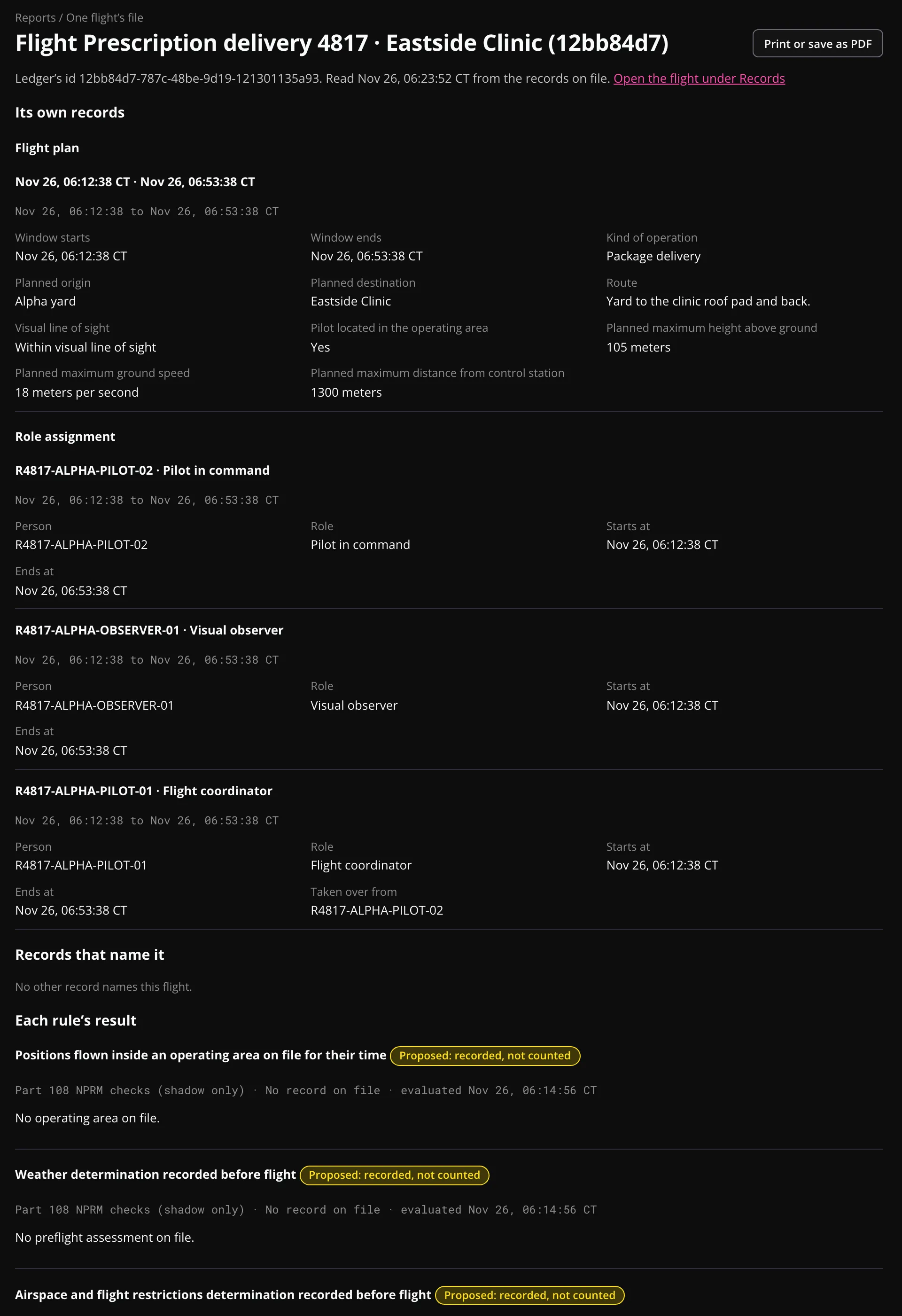
The page One flight's file for Prescription delivery 4817, Eastside Clinic, a fictional flight of Alpha Dispatch, with Ledger's id for it, the time it was read and a link to open the flight under Records, and a Print or save as PDF button. Its own records: a flight plan with its window, kind of operation (package delivery), origin Alpha yard, destination Eastside Clinic, route, visual line of sight, planned maximum height above ground of 105 meters, speed and distance; and three role assignments, a pilot in command, a visual observer and a flight coordinator, each with its person and times. Records that name it: none other. Then Each rule's result, starting with rules of the Part 108 NPRM checks (shadow only), each labelled Proposed: recorded, not counted, with its result, such as No record on file, and what is missing, such as No preflight assessment on file.
One flight’s file at Alpha Dispatch, a fictional operator: its own records, then each rule’s result, with its findings further down the same page.

13Program owner

A program owner’s view

An operator grants an organization that contracts it a read of named things for a period: the coverage of named packs by rule and result, open findings by rule with the oldest one’s age, and links to named produced sets. The program owner’s Ledger reads each operator it follows over the network, keeps every answer and failure, and shows them together, in alphabetical order.

  • Counts only, never a subject, a person or a safety report
  • A grant is revoked at once, and both sides keep their record of it
  • Each operator followed is read hourly; the period is not a setting yet
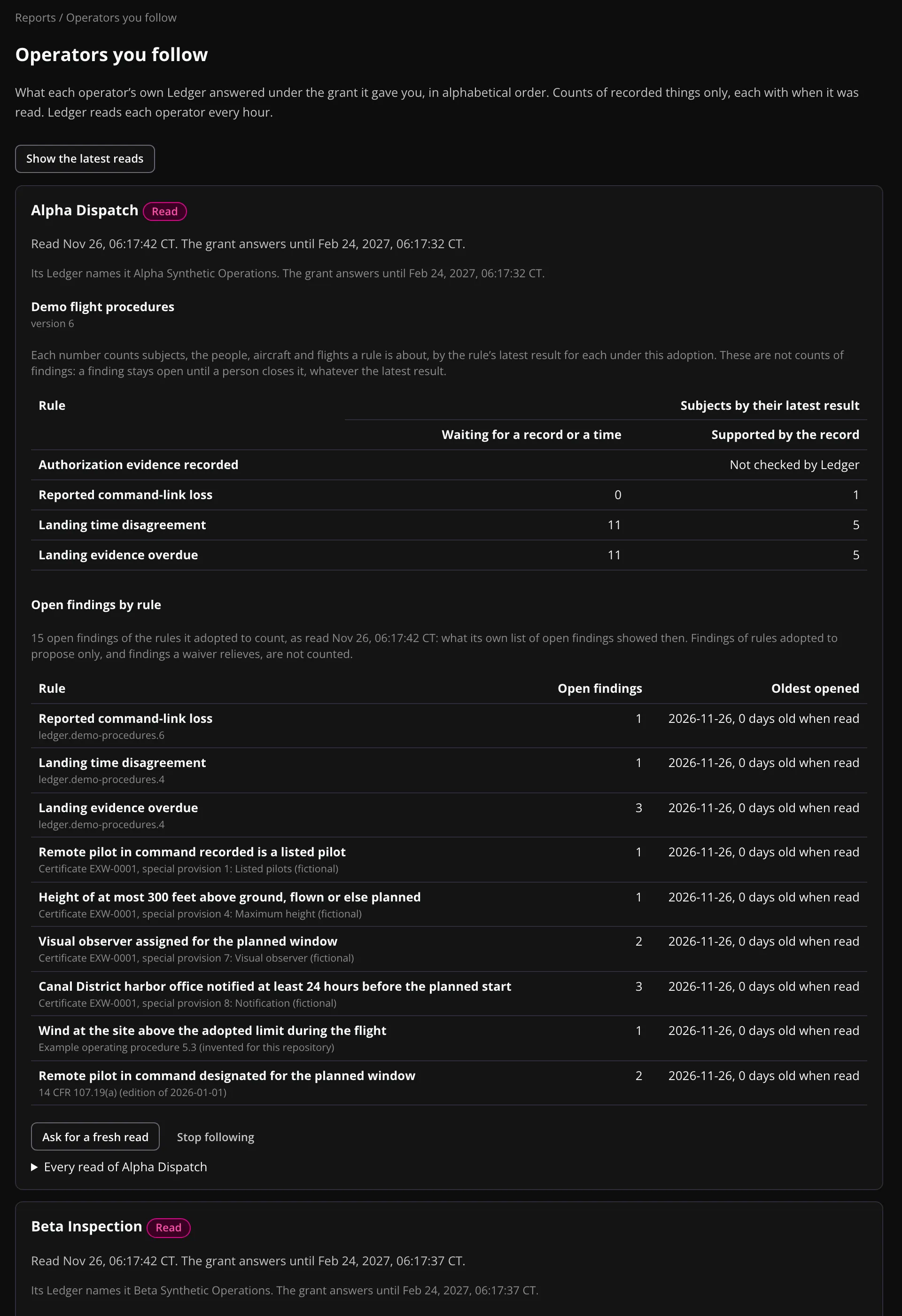
The Operators you follow report of Example Program Office, a fictional organization, which says it shows what each operator's own Ledger answered under the grant it gave, in alphabetical order, counts of recorded things only, read every hour. A card for Alpha Dispatch, marked Read, with when it was read and until when the grant answers. Under Demo flight procedures, version 6, a sentence says each number counts subjects by their latest result, not findings, then a table of its rules with subjects waiting for a record or a time and supported by the record. Under Open findings by rule: 15 open findings of the rules it adopted to count, as read Nov 26, 06:17:42 CT, what its own list showed then, with a table of each rule's open findings and the oldest one's age, and Ask for a fresh read and Stop following. Below, the top of Beta Inspection's card.
Operators you follow, at the fictional Example Program Office: what Alpha Dispatch’s and Beta Inspection’s own Ledgers answered under their grants, each operator in a card of its own, counts only.

14Safety management

Use it for your safety management system

A safety management system is an organization’s own: its policy, its accountable people, its procedures and its practice. Ledger is built to be used as infrastructure for your SMS, on the same journal as the flights. The Safety home lists what is on file and what is not, each with the action that starts it.

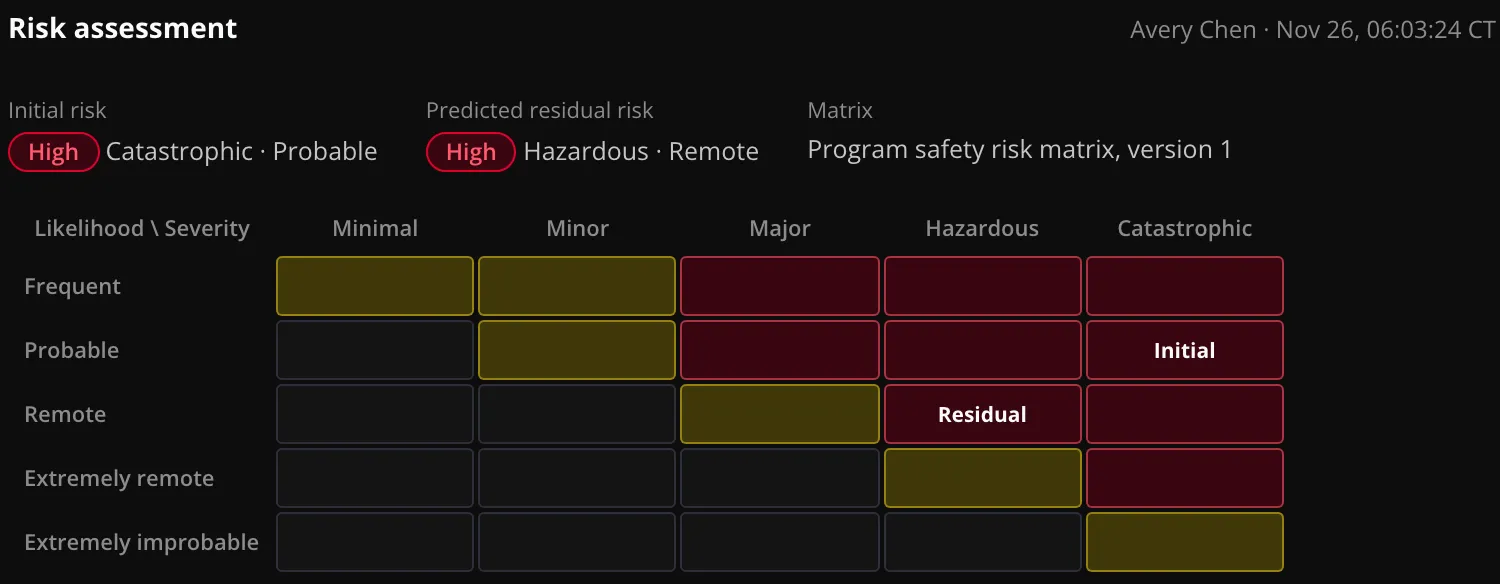
A risk assessment by Avery Chen on Program safety risk matrix, version 1: initial risk High, catastrophic and probable; predicted residual risk High, hazardous and remote, both marked on a five by five matrix of likelihood against severity.
A hazard assessed on the organization’s risk matrix. High risk needs someone whose authority covers it. Watch this scene
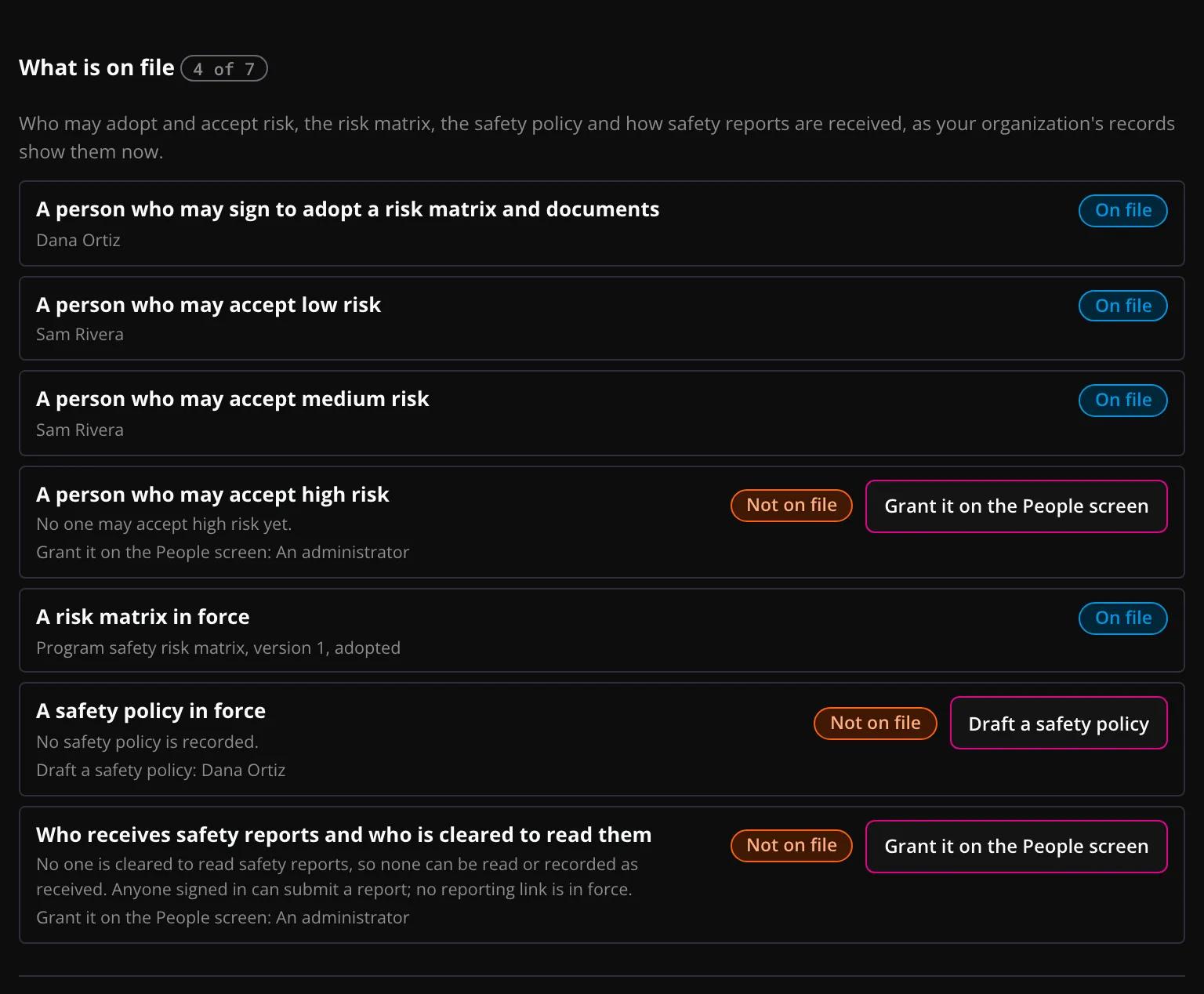
The What is on file list of the Safety home for Alpha Dispatch, 4 of 7. On file: a person who may sign to adopt a risk matrix and documents, Dana Ortiz; people who may accept low and medium risk, Sam Rivera; a risk matrix in force, Program safety risk matrix, version 1. Not on file: a person who may accept high risk, granted on the People screen by an administrator; a safety policy in force, with a Draft a safety policy button for Dana Ortiz; and who receives safety reports and who is cleared to read them.
What is on file on the Safety home at Alpha Dispatch, a fictional operator: each item on file or not, who may act on it, and the action that starts a safety policy.
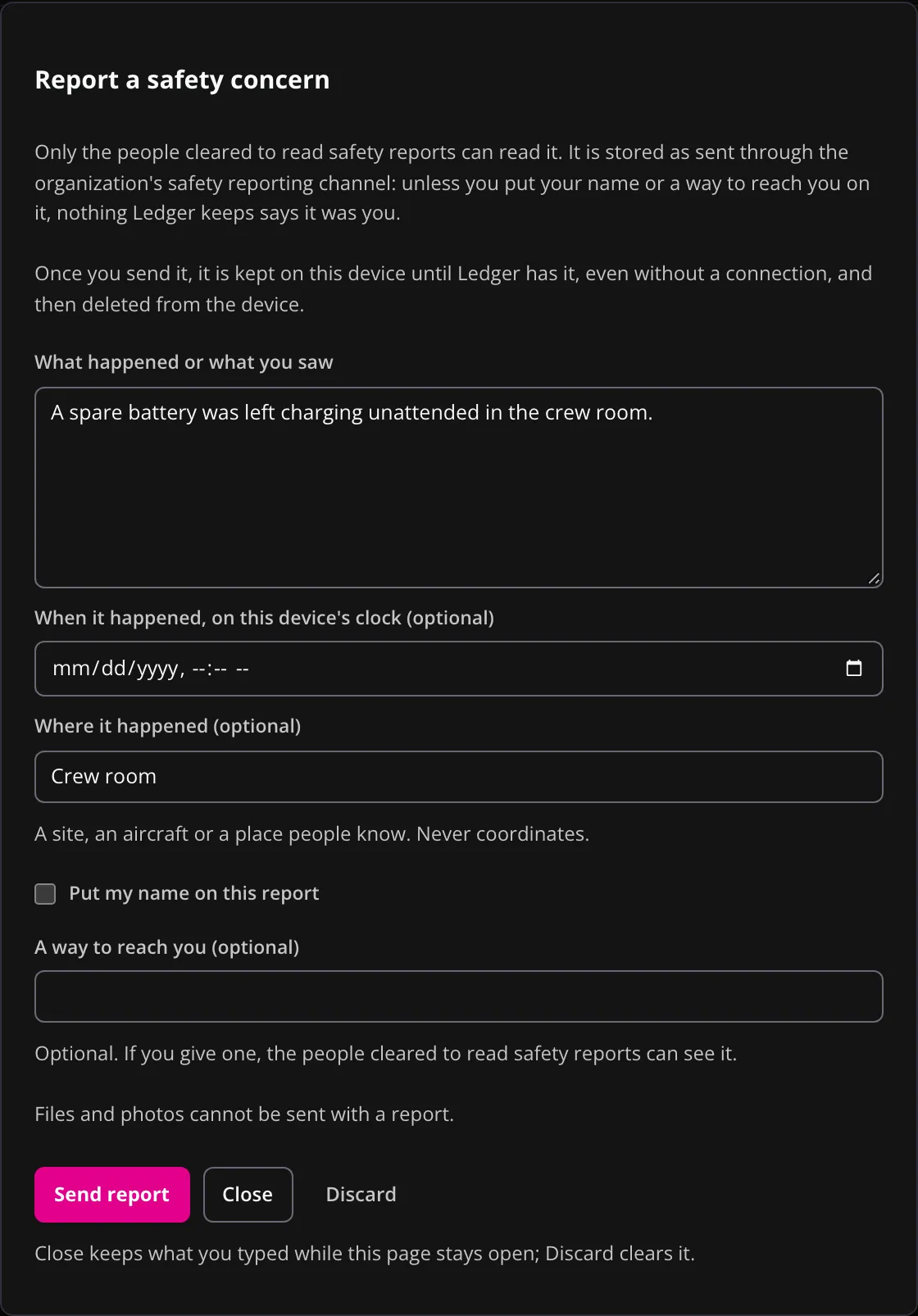
The Report a safety concern dialog. It says only the people cleared to read safety reports can read it, and unless you put your name or a way to reach you on it, nothing Ledger keeps says it was you; and that once sent it is kept on this device until Ledger has it, even without a connection. Fields: What happened or what you saw, filled with A spare battery was left charging unattended in the crew room; when it happened on this device's clock, optional; where it happened, Crew room, with the note a site, an aircraft or a place people know, never coordinates; an unticked Put my name on this report box; a way to reach you, optional. It notes files and photos cannot be sent with a report, with Send report, Close and Discard.
Report a safety concern, open from the top bar at Alpha Dispatch, a fictional operator, with a fictional report typed in. The name goes on it only if the person ticks the box.
  • Safety home. What is on file and what is not: who may adopt and accept risk, a risk matrix in force, a safety policy in force, who receives reports; and the safety assurance actions due and overdue, by owner
  • Safety reports people submit. Anyone signed in can report a safety concern from any screen, with their name on it only if they choose. A reporting link takes a report without signing in, and can be revoked at once.
  • Confidential handling. A report’s title, narrative and reporter are stored apart, readable only with a specific permission, and left out of every export. A note states what each way of reporting keeps and what the deploying organization must configure, such as a proxy’s access log.
  • Hazard register. Opened by hand, from a report, from a finding, or from a finding or action of a safety assurance record, keeping its origin
  • A risk matrix that starts from a standard 5 × 5 form the organization edits, with its own two to six levels, and is in force once a person with the authority signs it
  • Risk assessment and acceptance on the organization’s own risk matrix, by a person whose authority covers the level
  • Controls with an owner and dates, checked against flights once accepted
  • Safety assurance. Findings, indicators against flights or flight hours, and reviews of whether a control is working
  • Safety assurance records. Audits, evaluations of the safety program, investigations, the accountable executive’s reviews, assessments of a new or changed system and hazard notices: drafted and signed, each with actions that have an owner and a due date and are closed by a person
  • Controlled documents. Policy, roles and authority, emergency response plan, manual, procedures and notices: drafted, reviewed, signed, issued, reviewed on a schedule, withdrawn
  • Distribution and acknowledgement. Issued to named readers, each acknowledging one exact revision; the record shows who has and who has not
  • What is on file for proposed Part 108. Its application and safety management rules ask whether a record is on file and name it: a safety policy in force, a risk matrix adopted, a procedure for receiving reports, the accountable person designated, hazards recorded and assessed. They never judge content.
  • Records and retention each record labelled with its class; nothing is removed
  • Evidence you can export and verify offline

15Controls

Controls that become rules

Once a person with the authority accepts a control, it is checked against flights like any other rule, and each flight’s release lists it with its result.

  • An avoidance area declares how near a planned route must come for it to apply
  • A control that does not apply to a flight stays on the record, with what was measured
  • Missing inputs or an error mean the control applies
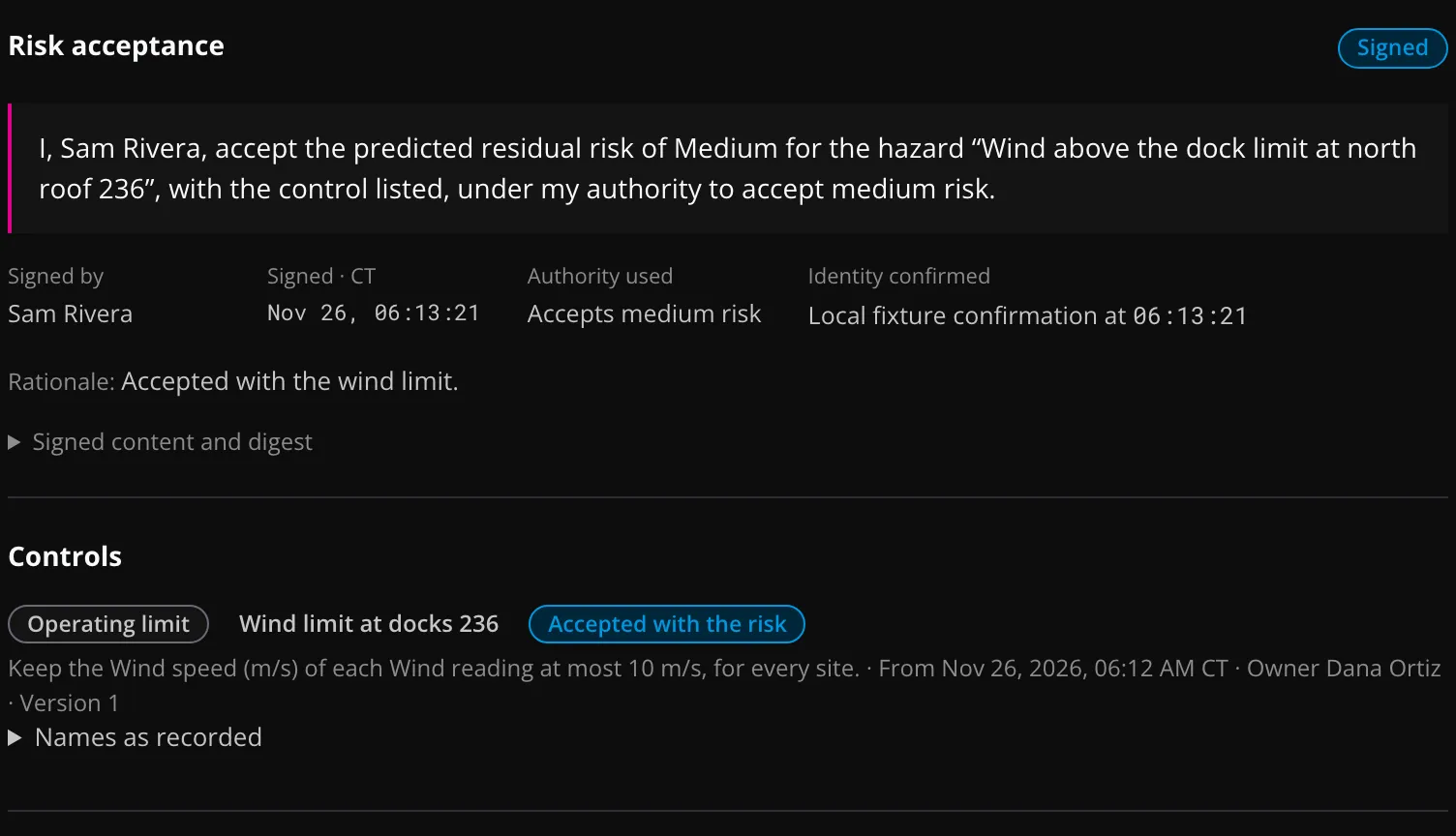
The risk acceptance and control on the fictional hazard Wind above the dock limit at north roof 236 at Alpha Dispatch. Sam Rivera's statement accepting the predicted residual risk of Medium with the control listed, signed Nov 26 at 06:13:21 under the authority Accepts medium risk, with the rationale Accepted with the wind limit. Below, under Controls: an operating limit, Wind limit at docks 236, Accepted with the risk: keep the wind speed of each wind reading at most 10 m/s, for every site, from Nov 26, 2026, owner Dana Ortiz, version 1.
A wind limit that began as a finding, accepted with its risk by the person whose authority covers the level, and from then on checked as one of the organization’s rules. Watch this scene

16Inputs

Records as you keep them, and sources

Records come in from a form, a CSV file or JSON, under your own ids, in your own time zone and units. Each outside system is one adapter that submits its data, with the original bytes, through the public API; pnpm adapter:run runs one for one source, with a credential an administrator issued.

  • Local times under a heading such as windowStartsAt [local], and feet, miles and knots named in the column heading, with each conversion kept with the record
  • An export with its own headings, date style and words is read as it is through a column mapping, a small YAML file kept beside it; Ledger keeps the export and the mapping with the records
  • An aircraft’s own log (PX4 .ulg, ArduPilot .bin, a MAVLink .tlog) is read into flight records by pnpm ledger records read-log, which writes only what the log holds and says what it could not read. The readers were checked against a few public sample logs only.
  • A flown flight has a flight record with its takeoff and landing times; where no aircraft reports them, rules read flown values from it
  • Duty and rest periods, operating areas (circles and corridors, more than one), time in service, maintenance and occurrences are records too
  • Imports have a template per record type; a file is checked first, and each refused row says why
  • Included adapters: Airspace Link AirHub, DJI Cloud API telemetry over MQTT, a generic order feed and a crew roster file, each built from the source’s documentation and run against emulators only, never against real equipment or a live service
  • Published weather reports (METAR and SPECI) and terminal forecasts from the Aviation Weather Center, and temporary flight restrictions from the FAA’s public list. These three were built against answers fetched once from the live services; none has run against its service for long. A forecast is kept as a forecast, never as a reading, and no shipped rule reads forecasts or restrictions yet.
  • The aircraft adapter’s height is above the WGS84 ellipsoid and is never compared with a limit above ground
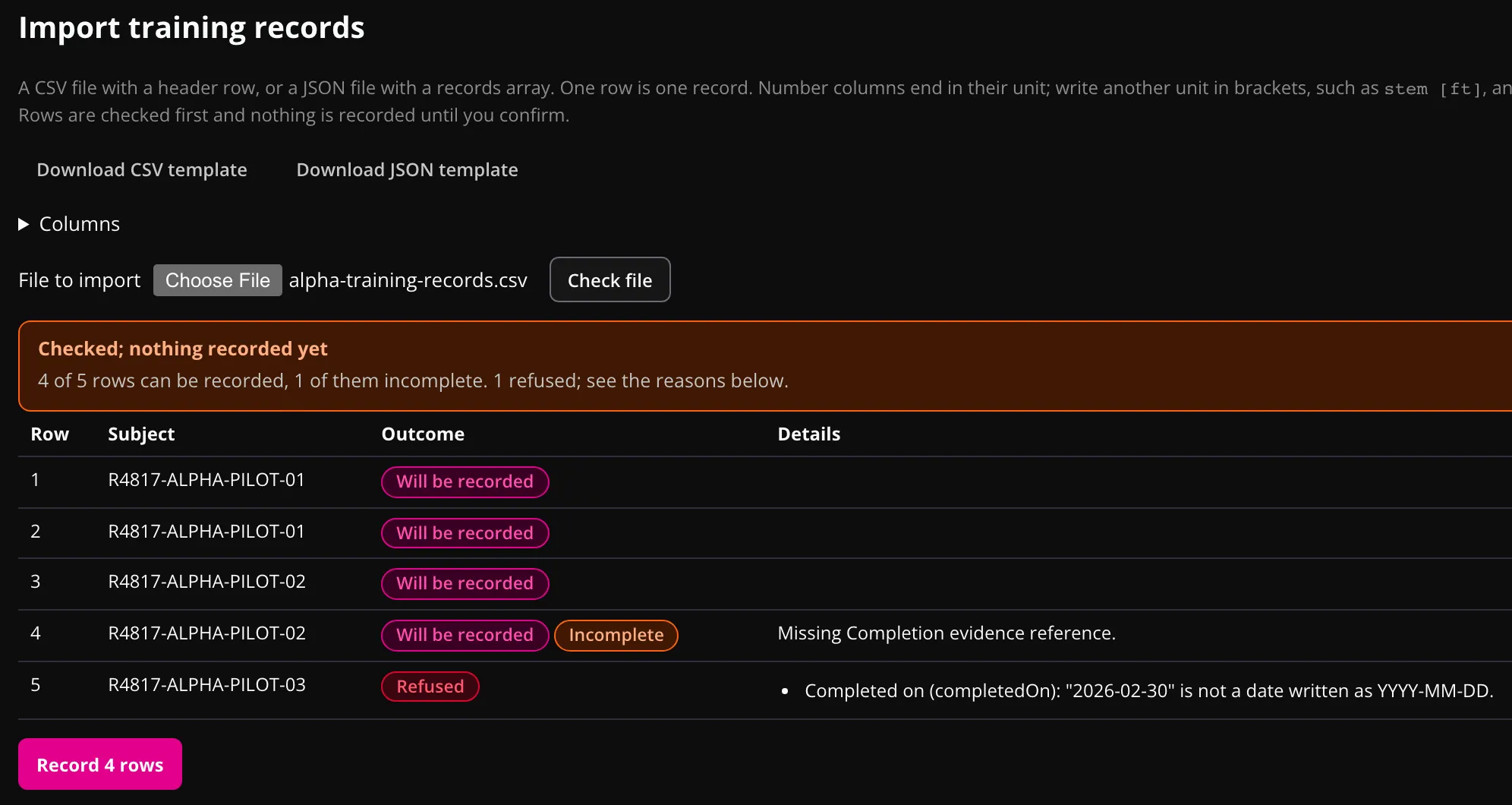
Import training records for Alpha Dispatch from the file alpha-training-records.csv. The check says nothing is recorded yet: 4 of 5 rows can be recorded, 1 of them incomplete for a missing completion evidence reference, and 1 refused because 2026-02-30 is not a date written as YYYY-MM-DD. A Record 4 rows button follows.
Operator records from a file: every row is checked before anything is recorded, and a refused row says why. Watch this scene

17In the field

Records entered with a poor connection

The web app installs on a phone and opens without a connection. A flight record or a preflight assessment entered in its form, and a safety report sent while signed in, are kept on the device until Ledger has them, then sent under the same person’s sign-in, once each.

  • The time the device wrote an entry is kept beside the time Ledger received it
  • Its content is deleted from the device as soon as Ledger has it
  • No credential is kept on the device: a reload signs the person out, and what they wrote waits until they sign in again
  • The person must have signed in, and opened Records, while there was a connection. Without one the form cannot suggest subjects on file, and nothing can be imported or attached.
The bottom of the flight record form on a phone. A notice, Kept on this device: Ledger cannot be reached; the entry is kept on this device and sent under your sign-in when Ledger can take it. Below the Record entry button: 1 of your entries waits on this device to be sent; Ledger cannot be reached now; they are sent when the connection returns. A button, Show what is kept on this device.
A flight record entered on a phone with no connection, at Alpha Dispatch, a fictional operator: kept on the device and sent under the same sign-in when Ledger can take it.

18Evidence

Evidence you can check without Ledger

A record can be exported with the records it depends on, their decisions and signatures. Anyone can verify the export offline.

  • The verifier in tools/verifier needs only Node
  • It imports no Ledger code and never runs code from the bundle
  • It checks hash chains, original bytes, tenant boundaries and the links between records
  • The same verifier checks records produced for an inspector against their manifest
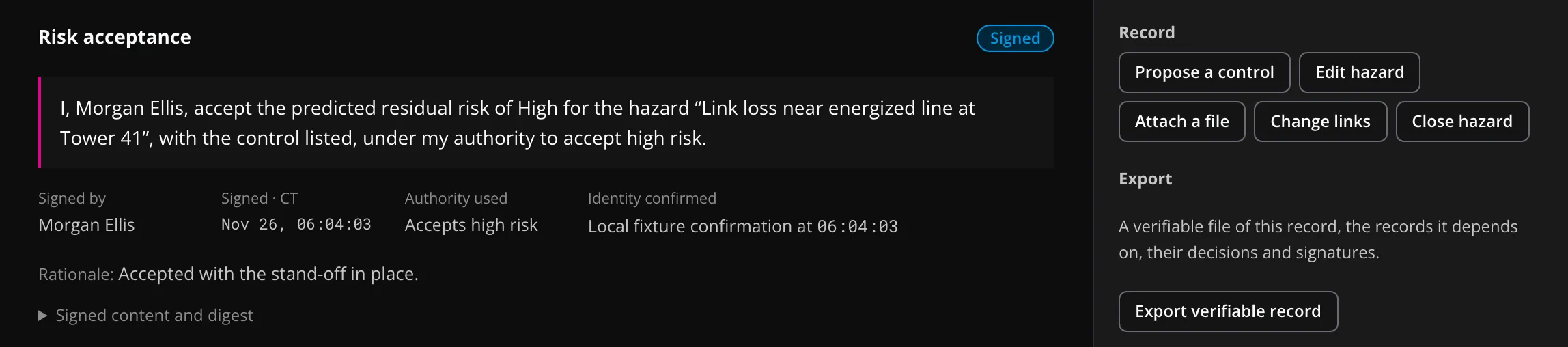
A signed risk acceptance on a hazard record: Morgan Ellis's statement, signed by Morgan Ellis on Nov 26 at 06:04:03, authority used Accepts high risk, identity confirmed by local fixture confirmation, with the rationale. Beside it, Export: a verifiable file of this record, the records it depends on, their decisions and signatures, and an Export verifiable record button.
A signed acceptance and the export that carries it. Watch this scene

19Integrity

Isolation and integrity

Organizations share one database and never each other’s records. Who is acting, and for which organization, comes from authentication, never from the request body.

  • Row-level security in PostgreSQL; the API and workers run as non-owner roles
  • Leased, fenced workers: a worker that lost its lease cannot commit effects
  • Inputs, receipts, journal events, decisions and signatures are append-only
  • One front door: the browser, imports, adapters and scripts all use the public API
The local sign-in panel with three fictional organizations: Alpha Dispatch, medical and parcel delivery; Beta Inspection, infrastructure inspection; Fictional Valley Power, utility drone program safety management. Below, a person picker set to Dana Ortiz, Dispatcher, the note that actions are recorded as the selected person, and an Open operations button.
Three seeded organizations, each a separate tenant, on the sign-in screen.

20Running it

Run it yourself

To try it, one Docker command starts Ledger and plain PostgreSQL on one computer, with no fictional organizations. For a small operation on one server, Ledger Lite is the smallest deployment: one container that runs the API, the web app and the workers in one process, beside plain PostgreSQL 17, with the original files on a volume. No object store, no broker.

  • The one-computer start accepts development tokens and says “Local development” on its sign-in screen; it is plainly not a server
  • Ledger Lite is the same image as any deployment: people sign in through your identity provider and development tokens are refused. Its Compose file was not brought up from the image for the deployment guide; its one process was run from a checkout against plain PostgreSQL.
  • One container image runs the API, which serves the web app, and the workers: no emulator, no simulator, no development sign-in, and only the packs that quote a regulation plus your own pack files. It is published for each release, for amd64 and arm64; until one is published, the same command builds it from the checkout.
  • PostgreSQL needs no extension; original files go to object storage or a folder on disk
  • Metrics in the Prometheus text format from the API, the workers and the adapter process, off unless configured; no label names an organization, a person or a record
  • A request limit per credential, and a changelog with an upgrade note for each release and a rule for what a release may change

Your own organization

From an empty database to where you stand.

pnpm org:create makes your organization with its name, its time zone and its first administrator, and seeds nothing fictional. Ledger then opens on Setup, a checklist of what is on file and what is not. Eight steps follow, the same whichever way you walk them, and none of them needs code. Your records stay in your own deployment.

With a coding agent. Give it Set up Ledger with a coding agent; it works with pnpm ledger, or with the same commands as tools through pnpm ledger mcp, and leaves each decision to a person. examples/first-operator is the whole path for an invented operator, with one script. By hand, in the browser. Set up Ledger for your organization walks each step in full.

shell
pnpm org:create --name "Example Aerial Survey" --time-zone America/Denver --admin "Avery Example"
  1. People

    On the People screen the administrator adds each person and sets what they may do. Every change is recorded with who made it; no one is ever deleted.

  2. Records

    Enter or import what you keep about your aircraft, pilots and flights under your own ids, in your own time zone and units. A file is checked first, and each refused row says why.

    shell
    pnpm ledger records check flight.plan organization/records/flight.plan.csv
    pnpm ledger records import flight.plan organization/records/flight.plan.csv
  3. Your waiver or procedure, as a rule pack

    Keep its text as issued and describe it beside it: the certificate’s number, its stated dates, which flights its conditions cover, and each provision. The builder finds and pins each quotation.

    shell
    pnpm pack:new my-waiver --kind waiver     # a folder with source.txt and pack.yaml to fill in
    pnpm pack:build my-waiver --out packs     # writes <id>-v1.pack.json and prints each rule it made
  4. Rules

    Adopt Part 107 and your waiver as active, and the proposed Part 108 in shadow, each for the dates you choose. The agent prints the adoption; the person who decides sends it with their own credential and reason.

    shell
    pnpm ledger packs adopt ledger.part107 --mode active --from 2026-06-01 --until 2028-05-31
  5. Coverage and findings

    Each adopted pack shows, section by section and rule by rule, who it covers and the latest result for each, including what is not on file. Open findings are one list, grouped by rule; a person takes each, records what was done and closes it, or takes or closes every finding of one rule as one decision.

    shell
    pnpm ledger coverage           # every adopted pack, rule by rule
    pnpm ledger findings list      # open findings grouped by rule, the rarest first
  6. Records on request, and the recordkeeping plan

    Produce the records of a pilot, an aircraft or a period as one file an inspector can read and anyone can verify. Records your rules require lists what the adopted texts ask you to keep, and starts a plan for a person to complete, sign and issue.

    shell
    pnpm ledger plan draft
  7. Safety

    The Safety home lists what is on file and what is not. Anyone signed in can report a safety concern from any screen, and a reporting link takes reports without sign-in. Hazards, risk acceptance, controls, audits, investigations and reviews with their actions, and controlled documents are kept on the same record.

  8. Sources

    To bring in what an aircraft, a dock or an airspace service reports, add the source, issue its credential on the People screen, and start an adapter process for it with pnpm adapter:run.

Extend it

New problems go at the edges, not in the core.

“A new problem type must be addable by touching only adapters, rule packs, control types and indicator definitions.”

The rule every change to Ledger serves

How it is built

Everything enters through one API and lands in one journal.

How Ledger is built People in a browser or phone, and imports and adapters, send to the public API. The API writes receipts, the append-only journal and the outbox. Leased, fenced workers build projections. The query API and server-sent events serve the web app. Exports go to an offline verifier. Peoplebrowser, phone Imports, adaptersoutside systems Public APIinputs, uploads,commands Append-only journalreceipts · outbox · PostgreSQLoriginal bytes: objects or disk Leased, fenced workersprojections, evaluations,deadlines ProjectionsSMS records, flights,timelines Query API, SSE, web appsafety home, registers,flight monitor Exportsrecords, decisions,signatures Offline verifierNode only, imports noLedger code
Where the record lives Checked without Ledger Each box is a part of the one codebase

One TypeScript codebase. PostgreSQL 17, with no extension, holds the journal, projections, work queue and outbox. Object storage, or a folder on disk, holds original bytes. A deployment runs the API and the workers as two processes, or as separate containers; Ledger Lite runs them in one process.

apps/api
Fastify public API: inputs, uploads, commands, queries, SSE
apps/workers
Leased, fenced work: projections, evaluations, deadlines
apps/web, packages/ui
Safety home, SMS registers and records, flight monitor
packages/domain, projections
Commands, decisions, rules, current state
packages/persistence
Transactions, migrations, row-level security, object store
packages/integrity, evidence
Hash chains and exports
packages/adapters
Source mappings into Ledger inputs
packages/flight-logs
Readers for aircraft logs, into flight records
packages/metrics
Metrics in the Prometheus text format
apps/simulator, apps/emulators
The simulated flight operation used for development and demos

What it is not, yet

Early software, described plainly.

  • Pre-releaseInterfaces, schemas and export formats can change, and a release may need the database recreated; its note in the changelog says so.
  • No regulator’s reviewNot certified or approved by any regulator. Ledger records what an organization did; the regulator decides what it means.
  • Not an SMS by itselfNot a safety management system by itself, and not a route to conformity with 14 CFR Part 5. It is built to be used as infrastructure for one; the policy, the people and the practice are the organization’s. The seeded policy and risk matrix are fictional examples.
  • Part 108 is proposedThe Part 108 material tracks a notice of proposed rulemaking. It can be adopted in shadow only, and it will change when a final rule is published.
  • Part 108 coverageThe Part 108 pack checks what a record or a document on file can show. A coverage note lists every paragraph of Subparts A, B, C and E with the rule that reads it or why none does. Which Ledger record holds each record the proposed § 108.40 lists is our reading, set out in another note; read it against your own operation before you rely on a recordkeeping plan drafted from it.
  • RetentionLedger keeps every record, correction and original file and removes none; it computes no retention period. It lists the periods the adopted rule texts state, in their own words, and drafts a recordkeeping plan from them. Keeping the deployment, its stored files and their backups for as long as those texts ask is the operator’s.
  • Safety reportsA note states what each way of reporting keeps and who can read it, and what Ledger cannot make true, such as the access log of a proxy in front of it. Those are the deploying organization’s to configure.
  • Sign-inLocal sign-in uses seeded development people or a development token. Outside local development people sign in through an OpenID Connect provider the deployment configures, self-hosted or not.
  • AdaptersNo shipped adapter has been run against real equipment, and only the weather report, forecast and flight restriction adapters have read a live service’s bytes, each from one fetch. Check each against your own before you rely on what it reports; the deployment guide lists what to compare and what was checked.
  • HeightThe aircraft adapter reads the height the aircraft’s documentation describes, above the WGS84 ellipsoid, which is never compared with a limit above ground: a height rule rests on the height the operator’s flight record states, or else the planned height, and says which, until a source reports height above ground or above the takeoff point.
  • DeploymentThe deployment guide marks each step that was not run. On one computer, with local names and certificates, the production Compose file was run with PostgreSQL, an object store, Keycloak and a TLS proxy; people signed in through Keycloak and signed a document in the browser; and a backup was restored into empty containers and checked. Not run: a public server with certificates the proxy obtains itself, Google Workspace or Microsoft Entra ID as the identity provider, and Ledger Lite’s Compose file from the image (its one process was run from a checkout against plain PostgreSQL).
  • SimulationThe simulated operation and emulators exist to exercise the system. They are not flight software and control no aircraft.

Open work

  • Real equipmentNo shipped adapter has read a message from a real aircraft, dock or airspace service. Until one has, an operation’s flown values come from its own records.
  • Parts of the proposed Part 108 no record type holds yetPopulation density categories, strategic deconfliction and conformance monitoring, operations over people, package delivery, hazardous materials and agricultural operations have no record type and so no rule. The coverage note lists each paragraph.
  • The final ruleThe Part 108 pack quotes the notice of proposed rulemaking. When a final rule is published it needs a new pack version quoting the final text.
  • Flights dated before an adoption startsA flight on file before an adoption is made, and dated before its first day, is not checked; the same flight imported afterwards, or still on file when a newer version replaces the adoption, is. Until that is made one rule, adopt from a day on or before your earliest record, which checks every flight either way. docs/design/rule-coverage.md has the detail.
  • Records an old log never heldA rule about a record your log did not keep, such as when a notice was requested or the gust at takeoff, finds it missing on every flight, and a notice cannot be recorded without the time it was made. A person closes those findings by rule and dates; nothing fills them in.
  • Other flight log formatsrecords read-log reads PX4 ULog, ArduPilot DataFlash and MAVLink telemetry logs, checked against a few public sample logs only. A manufacturer’s own flight log and a log service’s export have no reader yet (an export can be read through a column mapping); each needs someone with a real file. A log larger than 10 MB cannot yet be kept as the original, so it cannot be imported this way.
  • One finding from the command lineThe client reads one finding (findings show), but takes and closes findings only by rule, subject kind and dates. Taking or closing a single finding is done in the browser.
  • Safety files over MCPThe MCP server prepares a person’s safety decisions, but has no tool for the safety record templates, checks and drafts; an agent runs pnpm ledger safety for those.
  • Visibility under § 107.51(c)The Part 107 rule reads the visibility a preflight assessment states and not the visibility at takeoff on the flight record.
  • Replacing a version from its first day in the browserThe command line and the API do it; the Rules screen’s form replaces from a later day only.
  • An adoption sent right after anotherWhile the rules of one adoption are still being queued, a second adoption can be refused as a concurrent change. The command-line client waits and sends it again; the cause on the server is not yet found.
  • Operating areas as polygonsAn operating area is a circle or a corridor.
  • Attachments on a submitted safety reportA person who submits a report cannot send a file or a photo with it.
  • One command without DockerLedger Lite still needs Docker or a PostgreSQL server. Whether an embedded PostgreSQL could start Ledger for one operator with one command is looked into, not settled, in docs/design/embedded-database.md.
  • Rules over forecasts and flight restrictionsForecasts and restrictions are recorded, but no shipped rule reads them: no check kind compares a forecast period’s wind or visibility with a limit, or asks whether a restriction’s interval overlaps a flight’s window. A restriction is matched to a circle the adapter’s configuration names, not to the operating areas recorded in Ledger.
  • NOTAMsThe FAA’s NOTAM service needs an account, and its response format is not published without one, so no adapter reads NOTAMs other than temporary flight restrictions.
  • Extra fields on a built-in record typeA pack declares whole record types of its own; it cannot yet add a field to one of Ledger’s, such as aircraft.inspection. Declare a type of your own about the same aircraft instead. Record types a pack declares says why.
  • Packs kept per organizationPack files, and the record types they declare, are read from one folder for the whole deployment, and the catalogue shows each to every organization on it. An organization has a declared type, and can record one, only once it adopts the pack.
  • Notices on a record’s historyA sent notice is listed on the administrator’s list of notices, not yet on the history of the record it is about.
  • Crewed operationsLedger’s built-in record types, roles and some check kinds are written for unmanned operations. What an operation under Part 91 or Part 135 would need, which of it a pack can declare, and the core changes left (a related subject on a declared type, a unit of mass, crewed positions, crew time over calendar periods) are listed in docs/design/crewed-operations.md; none is built.
  • Entering records offline, beyond the formAn entry kept on a phone needs the person to have signed in, and opened Records, while there was a connection, and a reload signs them out until there is one again. Without a connection the form cannot suggest subjects on file, an import or any other form cannot be used, and nothing can be attached. The app’s icon is the one SVG mark; a phone that wants a bitmap icon on its home screen shows its own.
  • A finding closed and opened again, in the reportsA report counts each finding by its current state: one closed in a period and opened again later counts as open, and its earlier closing is only in its own history.
  • An indicator’s limitA limit is drawn only where an indicator’s definition sets one; no shipped indicator does yet, since setting one is a new version of the definition.
  • Flights an order source reports, in the summaryA summary counts flights from their flight records; a flight known only from an order source’s reports is not counted until its flight record is on file.
  • Aircraft-estimated windThe aircraft adapter does not map the aircraft’s own wind estimate, because its unit is not documented.
  • Many operators followedA program owner’s Ledger reads each operator it follows hourly, one call at a time per worker pass; the period is not a setting yet. A host name that resolves to an internal address is not refused by Ledger: the deployment’s network rules keep its workers from calling one.
  • One request limit across API processesThe limit per credential is held by each API process, so two processes allow twice as much; requests without a credential are still the proxy’s to limit.

Licence

Apache License 2.0

Ledger is licensed under the Apache License, Version 2.0. You may use it, change it and build on it, including in a commercial product. A contribution you submit comes in under the same terms; there is nothing to sign.

Work with us

Want Ledger hosted, or built around your operation?

Lightcone Systems hosts Ledger and builds custom versions of it with operators. Tell us what you fly and what you have to keep a record of.