Onboarding guide
Get Ledger running
Try it with Docker and nothing else, or run it from a source checkout to change it or to watch the simulated operation. Everything runs locally; no account or outside service is needed.
Three tracks: Ledger with Docker alone, then a source checkout with the fictional operators, then your own organization, from an empty database to a deployment.
Track 1
Try it with Docker alone
Ledger and PostgreSQL on your computer, with no fictional organizations: your own, from the start.
-
What you need
Docker and nothing else: Docker Desktop, or Docker Engine with the Compose plugin 2.24 or later. And a copy of the repository, with
git cloneor as the zip from its GitHub page. -
Start Ledger
This starts Ledger and PostgreSQL, with Ledger on
127.0.0.1only. It runs the published image and the migrations, then waits until Ledger answers.shellgit clone https://github.com/chrisremboldt/lightcone-ledger.git cd lightcone-ledger docker compose -f infra/compose.try.yaml up -d --waitThe image is
ghcr.io/chrisremboldt/lightcone-ledger, for amd64 and arm64. If it cannot be pulled (none has been published yet), the same command builds it from the checkout instead, which takes several minutes;--buildbuilds it again after you change the checkout. -
Create your organization and sign in
Give it its name, its time zone and your name:
shelldocker compose -f infra/compose.try.yaml run --rm setup apps/api/dist/create-organization.js \ --name "Example Aerial Survey" --time-zone America/Denver --admin "Avery Example"It prints your development token once. Open 127.0.0.1:4000, choose Use a development token and paste it. Ledger opens on Setup; from there, track 3 says what comes next. Each
pnpm ledger <command>in it runs here as below, with the token in.ledger/credentials, as Try Ledger on one computer shows.shelldocker compose -f infra/compose.try.yaml run --rm client meThis start is for one computer and is plainly not a server: it accepts development tokens, says “Local development” on its sign-in screen and in its log, and keeps uploaded files in a Docker volume.
docker compose -f infra/compose.try.yaml downstops it and keeps your records;down -vdeletes them.
Track 2
From a source checkout, with the fictional operators
To change Ledger, or to watch the simulated operation, run it from the checkout with Node, pnpm and Docker. About fifteen minutes.
-
What you need
Three tools, at the versions the project pins. Docker runs PostgreSQL, object storage and the message broker; Node and pnpm run everything else.
- Node 24engines: >=24 <25
- pnpm 11.19.0pinned in packageManager
- Dockerwith Compose
Node 24 ships with Corepack, which provides the pinned pnpm. Run this once:
shellcorepack enableWhere
corepack enableis not allowed (it writes to a system folder), typecorepack pnpmwherever this page sayspnpm, or put a one-linepnpmon yourPATH:shellmkdir -p ~/.local/bin && printf '#!/bin/sh\nexec corepack pnpm "$@"\n' > ~/.local/bin/pnpm && chmod +x ~/.local/bin/pnpm -
Get the code
Clone the repository, copy the example environment, install the dependencies from the lockfile, and download the Airspace Link API schemas the local emulator checks requests against. The schemas are not kept in the repository.
shellgit clone https://github.com/chrisremboldt/lightcone-ledger.git cd lightcone-ledger cp .env.example .env pnpm install --frozen-lockfile pnpm vendor:airspaceThe values in
.env.exampleare fixtures for the local stack. They are not secrets and must not be used anywhere else. -
Start the local services
Compose starts PostgreSQL, an S3-compatible object store for original bytes, and an MQTT broker for drone telemetry. With
--waitit returns only when they are up.shelldocker compose -f infra/compose.yaml up -d --wait -
Build, migrate and seed
Build the packages, create the schema, then seed the three fictional organizations, their people, a risk matrix and the rule packs they start with. The build takes about twenty seconds; migrating and seeding a few more.
shellpnpm build && pnpm db:migrate && pnpm db:seedYou should see, among the seed’s output
Adopted ledger.demo-procedures version 6 for tenant-alpha, tenant-beta
Seeded the fictional utility tenant and adopted its 5×5 risk matrix
Drafted the fictional safety policy for adoption
-
Run it
Write the local broker’s accounts from the seeded sources (only the telemetry scenarios use the broker), then start every app in the repository together: the API, the workers, the web app, the emulators and the simulator. Leave
pnpm devrunning in its own terminal; the later steps need it.shellpnpm broker:files:dev && docker compose -f infra/compose.yaml restart mqtt pnpm devYou should see
After a few seconds the web app answers at localhost:5173, on the sign-in screen headed “A record you can act on.”
-
Sign in as the fictional operators
Pick an organization and a person. All of them are fictional. Actions come from the chosen person’s current authority; picking a person grants no permissions.
-
Alpha Dispatch
Medical and parcel delivery · runs the simulated flight operation
- Dana Ortiz · Dispatcher
- Sam Rivera · Field crew
-
Beta Inspection
Infrastructure inspection · runs the simulated flight operation
- Lee Park · Dispatcher
- Jordan Hale · Field crew
-
Fictional Valley Power
A utility drone program · the safety management features
- Avery Chen · Safety manager
- Morgan Ellis · Accountable executive
- Jordan Reyes · Pilot
A first look around: as Dana Ortiz, open Flights to see the flight monitor and anything that needs attention; open Rules to see which packs Alpha has adopted and in which mode. As Avery Chen, open the safety home, the hazard register and the controlled documents.
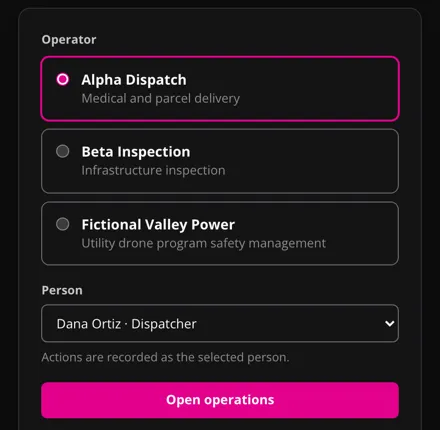
The sign-in panel of a local Ledger, with Alpha Dispatch chosen. Optional, after seeding:
pnpm demo:documentsprepares the fictional controlled-document example. -
-
Run a simulated day
With
pnpm devstill running, in a second terminal, fly ten overlapping flights through the order and Airspace Link emulators. The run then checks itself with 19 assertions, tenant isolation among them, and fails if any of them fails. It can run again on the same database.shellpnpm scenarioYou should see, at the end
M0–M1 scenario: PASS · 10 flights · 19/19 oracle assertions
The report is written to
.local/scenarios/m0-m1. For more traffic,pnpm demoresets and runs a continuous simulated operation until Ctrl-C, andpnpm scenario:telemetryflies one DJI flight over MQTT; open it and choose “Telemetry map”. -
Watch a scene play on your machine
On the sign-in screen, pick an organization and choose a scene under Watch a simulated person use Ledger. A visible cursor signs in as fictional people and works through the real screens, with captions. It makes real records in your local database; you can pause it or take over at any point.
urlhttp://localhost:5173/?autopilot=landingReplace landingin the address with any scene name to start it directly.Scene Organization What happens A hazard is identified, assessed and accepted hazardFictional Valley Power The safety manager records a hazard; the risk is above their authority, so the executive signs. A procedure is written, signed, issued and acknowledged documentsFictional Valley Power A document goes from draft to a pilot’s personal acknowledgement of one exact revision. A landing report goes missing landingAlpha Dispatch An adopted rule opens a finding by itself; the dispatcher owns it, late evidence arrives, and it is resolved. A lost control link becomes a hazard lostlinkAlpha Dispatch A link monitor reports a lost control link; the finding is promoted to a hazard tied to the flight and assessed. New evidence arrives mid-decision decisionBeta Inspection A decision is refused because the record changed underneath it, then recorded after a fresh look. Wind at a dock rises above the adopted limit windAlpha Dispatch A wind limit is adopted, the dock measures wind above it in flight, and the finding becomes a limit the next flight lists. One flight checked against today’s rules and proposed ones rulesAlpha Dispatch Part 107 and a waiver are adopted as active and proposed Part 108 in shadow; one flight shows both, kept apart. -
Run the checks
The same checks a change has to pass before it is merged.
shellpnpm verify # format check, build, typecheck, unit tests pnpm test:integration # PostgreSQL tests against a separate ledger_test database pnpm test:browser # with the seeded pnpm dev stack runningpnpm verifyPrettier’s format check, the build, a production-build check, the type check and the unit tests.pnpm test:integrationTests against PostgreSQL in a separateledger_testdatabase, so your seeded data is left alone.pnpm test:browserPlaywright tests that drive the real screens. They need the seededpnpm devstack running.
-
Where next
Rule packs and adapters are the two extension points, and where outside help is most useful.

Track 3
Run it for your own organization
From an empty database to seeing where your own operation stands, following the README’s Your own organization. Start Ledger and create your organization, then hand the rest to a coding agent, or walk it by hand in the browser with Set up Ledger for your organization. The steps are the same either way, and none of them asks you to write code.
-
Start Ledger without the fictional organizations
The Docker start of track 1 is one, and its step 3 creates your organization. From a source checkout, with Node 24, pnpm 11.19.0 and Docker, it is track 2 without the seed:
shellgit clone https://github.com/chrisremboldt/lightcone-ledger.git cd lightcone-ledger corepack enable cp .env.example .env pnpm install --frozen-lockfile pnpm vendor:airspace docker compose -f infra/compose.yaml up -d --wait pnpm build && pnpm db:migrateLeave out
pnpm db:seed, and delete the last block of.env, headed “The seeded fictional organizations”, which configures them; Ledger starts without it. -
Create your organization
pnpm org:createcreates an organization with its name and time zone, and its first administrator, on a migrated database. It seeds nothing fictional, and running it again changes nothing. Every screen shows times in that time zone. (With the Docker start, track 1’s step 3 did this.)shellpnpm org:create --name "Example Aerial Survey" --time-zone America/Denver --admin "Avery Example" pnpm devOn a local database the administrator gets a development token, printed once: with
pnpm devrunning, choose Use a development token on the sign-in screen and paste it. In a deployment the administrator is tied instead to their account at the deployment’s OpenID Connect provider, with--sign-in-issuerand--sign-in-subject. To try that sign-in locally, runpnpm test-issuerand follow the deployment guide’s Try it locally with the test issuer. On a local database the administrator also issues a development token to each person added, so several people can try Ledger on one computer. -
Your first screen: Setup
Until your organization adopts its first rule pack, Ledger opens on Setup for whoever may add people, keep your records or adopt rule packs. It lists seven steps: the people who sign in; an aircraft, a pilot and a flight on record; your own waiver or procedure offered as a rule pack; a rule pack adopted; what coverage says; the safety items the Safety home lists; and, optionally, records produced for someone who asks.
Each step says, with your own names and ids, what is on file and what is not, the one action that starts it and who may take it. A step done on a command line, such as building a pack file, shows the command instead. Nothing is ticked by hand: each step reads what is on record. Its address is
/setup, and it stays in the bar until steps 1 to 4 and 6 are on file.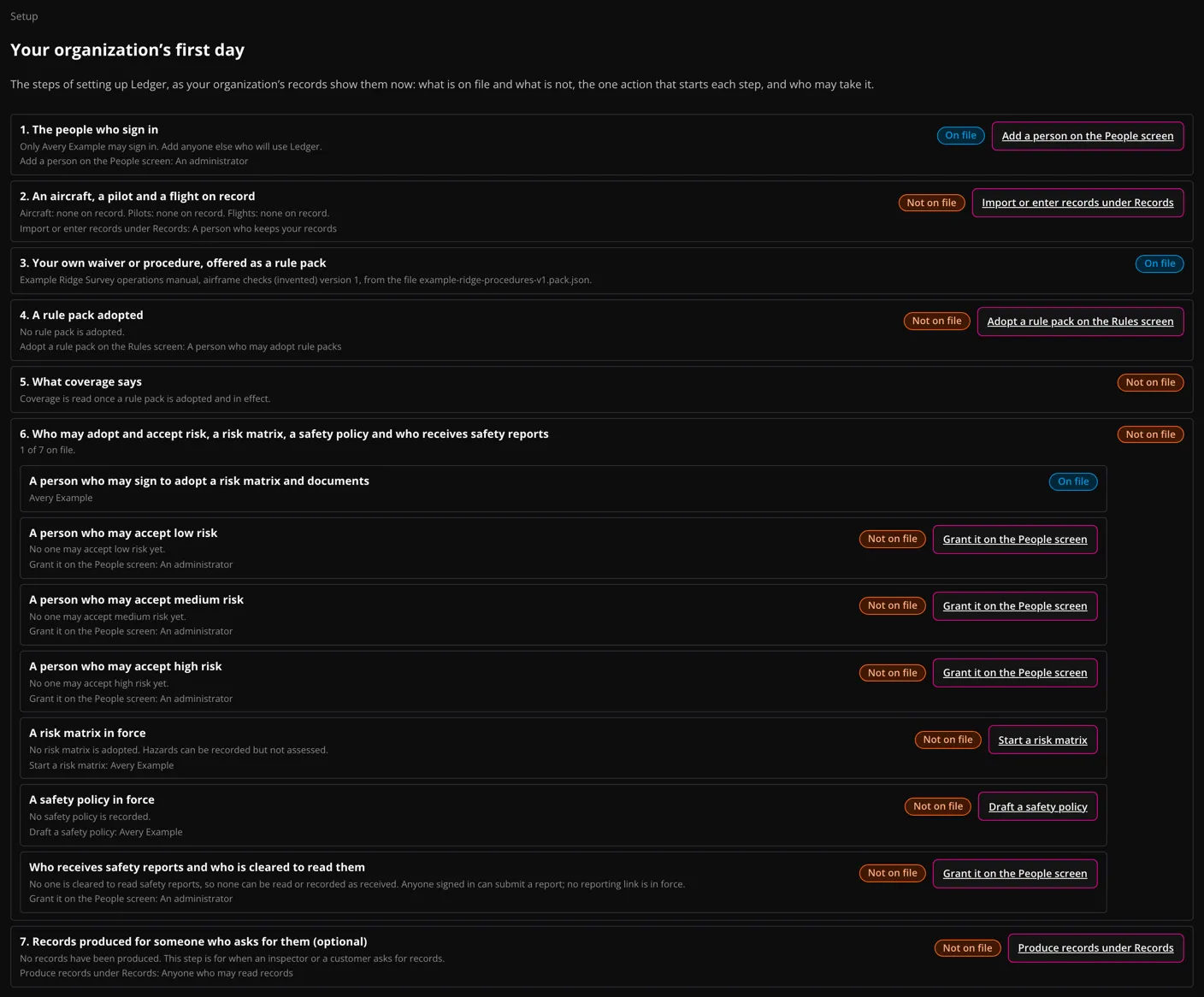
Setup for a new organization, the fictional Example Aerial Survey, before anything but its administrator is on file. -
Hand the rest to a coding agent
Give the agent Set up Ledger with a coding agent. It is written to the agent: every command, what it may do alone, and what only a person does. The agent works with
pnpm ledger, a command line over the public API, under a credential the administrator issues to it as a service, which may import and read. An agent that speaks the Model Context Protocol can call the same commands as tools throughpnpm ledger mcp; a tool that would send an adoption, a grant or a decision prepares the command for a person to run instead. Your spreadsheets, your waiver and the files it makes stay outside the checkout, or in its git-ignoredorganization/folder.shellpnpm ledger --help # the client's commands pnpm ledger me # who the credential is, its organization and time zone, what it may doTry it first on an invented operator. examples/first-operator is the whole path for Example Ridge Survey, which flies under a Part 107 waiver for flights beyond visual line of sight: its waiver, its records as CSV files, and one script, from the waiver and the spreadsheets to coverage. On a local, empty database:
shellexamples/first-operator/run.sh prepare # creates the organization and builds its waiver's pack examples/first-operator/run.sh # after setting LEDGER_PACKS_DIR and starting pnpm devThe example’s script runs its three adoptions itself, with the example administrator’s development token. In your organization the agent prints each adoption, and the person who decides sends it with their own credential and reason. The API refuses an adoption from anything but a person.
Steps 5 to 12 are what the agent does, and what you do in the browser if you walk it by hand.
-
People
On the People screen, add each person and set what they may do. Every change is recorded with who made it; no one is ever deleted. These are the people who use Ledger, not your crew list. Adding people and issuing a credential grant authority, so they stay with the administrator; the agent prepares the list.
-
Records
Enter or import what you keep about your aircraft, pilots and flights, from a form, a CSV file or JSON, under your own ids, in your own time zone and units. There is no separate step to add an aircraft or a pilot: each exists once a record names it. A flight that has flown gets a flight record with its takeoff and landing times; duty and rest periods, operating areas and time in service are records too.
A column heading names the time zone or the unit the spreadsheet uses, and Ledger keeps the conversion with the record:
csvsubjectId,secondarySubjectId,takeoffAt [local],landingAt [local],maxHeightFlownAboveGround [ft] FLT-2026-1101,RIDGE-AC-1,2026-11-10 09:05,2026-11-10 09:47,148A file is checked first, and each refused row says why; importing the same file again records nothing twice.
shellpnpm ledger records template flight.plan --out organization/records/flight.plan.csv pnpm ledger records check flight.plan organization/records/flight.plan.csv pnpm ledger records import flight.plan organization/records/flight.plan.csvAn export with its own headings, date style and words is read as it is through a column mapping, a small YAML file kept beside it; Ledger keeps the export and the mapping with the records. An aircraft’s own log (PX4
.ulg, ArduPilot.bin, a MAVLink.tlog) is read into rows of flight records, with only what the log holds; the readers were checked against a few public sample logs only.shellpnpm ledger records mapping flight.record organization/received/flight-log.csv --out organization/records/flight-log.mapping.yaml pnpm ledger records check flight.record organization/received/flight-log.csv --mapping organization/records/flight-log.mapping.yaml pnpm ledger records read-log organization/received/logs/2026-11-10-ridge.ulg --out organization/records/2026-11-10-ridge.flight.record.csv -
Your waiver or procedure, as a rule pack
Keep its text as issued in a file and describe it beside it: the certificate’s number, its stated dates, which flights its conditions cover, and each provision. No code and no offsets: the builder finds each quotation and pins it. Every provision is carried, as a rule a check runs, one a person checks, or one not supported yet.
shellpnpm pack:new my-waiver --kind waiver # a folder with source.txt and pack.yaml to fill in pnpm pack:build my-waiver --out packs # writes <id>-v1.pack.json and prints each rule it made--kind procedurestarts from a small invented operations manual instead. SetLEDGER_PACKS_DIRto thepacksfolder and restart. A provision that grants relief names the rule it relieves; this prints the ids of the Part 107 pack’s rules:shellpnpm pack:list ledger.part107While the waiver is adopted as active, that rule’s result for a flight flown under the waiver is recorded as relieved, with the provision. A flight not flown under the waiver is recorded as one its conditions do not cover. Once the waiver is adopted, the Rules screen says when its stated dates end. Write a rule pack has the whole format.
-
Rules
Adopt what you operate under as active, for example Part 107 and your waiver, and what is only proposed, such as Part 108, in shadow, where its findings are recorded and never counted, each for the dates you choose. An adoption is a person’s decision. The agent prints it, and sends nothing:
shellpnpm ledger packs adopt ledger.part107 --mode active --from 2026-06-01 --until 2028-05-31The person who decides reads the printout and runs the same command with their own credential and
--reasonin their own words, or adopts on the Rules screen, which lists every rule in the pack with how it is checked. -
Coverage and findings
Each adopted pack shows, section by section and rule by rule, who it covers and the latest result for each, including what is not on file: “No remote pilot certificate on file” for a pilot is a count you can open, not a silence. A result states times in your time zone and a value in the unit the rule’s text uses.
shellpnpm ledger coverage # every adopted pack, rule by rule pnpm ledger findings list # open findings grouped by rule, the rarest first; --rule for one rule's, --all for every one pnpm ledger findings list --proposed # the findings of rules adopted in shadow: recorded, never countedOpen findings are one list, grouped by rule. A person takes each or assigns it, records an action with its due day and what was done, and closes it with a reason, or takes or closes every finding of one rule as one decision; a record you keep that answers it closes it by itself. The API refuses these from a service’s credential.
-
Records on request, and the recordkeeping plan
Produce the records of a pilot, an aircraft or a period as one .zip an inspector can read and anyone can verify offline. A person decides what to produce and why, and the production is recorded with its reason and who asked:
shellpnpm ledger records produce --subject aircraft:RIDGE-AC-1 --type flight.record --from 2026-11-01 --until 2026-11-30 \ --reason "<why, in their words>" --requested-by "<who asked>" --out ridge-flights.zipRecords your rules require lists what the adopted texts ask you to keep, with the retention each states in its own words and what is on file, and starts a recordkeeping plan from it. The plan leaves blanks only you can fill: who is responsible, where the deployment runs, how it is backed up, and for how long you undertake to keep the records. A person completes it, has it signed and issues it.
shellpnpm ledger plan draftLedger keeps every record and removes none; it computes no retention period. Keeping the deployment and its backups for as long as each text asks is yours. Which Ledger record holds each record the proposed § 108.40 lists is Ledger’s reading, set out in required-records.md: read it against your own operation.
-
Safety
The Safety home lists what is on file and what is not: who may adopt and accept risk, a risk matrix in force, a safety policy in force, and who receives safety reports. Each item not on file has the action that starts it.
- A risk matrix starts from a standard 5 × 5 form you edit, with your own two to six levels, and is in force once a person with the authority signs it.
- If you already keep a safety program,
pnpm ledger safetydrafts your matrix, policy, hazard register, audits and reviews from files, under your own references; a person accepts, signs and issues each. - A safety policy is drafted, signed, issued to named readers and acknowledged by each.
- Anyone signed in can report a safety concern from any screen, with their name on it only if they choose. A reporting link, issued by a person on the Safety reports screen, takes reports without signing in.
- Audits, investigations, the accountable executive’s reviews and the other safety assurance records are signed by a person, each with actions that have an owner and a due date. The Safety home lists the actions due and overdue.
What submitting a safety report keeps says what Ledger keeps about each report and its sender, and what your proxy’s logs may keep.
-
Sources
To bring in what an aircraft, a dock or an airspace service reports, add the source and issue its credential on the People screen, then start an adapter process for it. The secret is shown once; Ledger keeps only its hash. This prints every flag and the environment variable that can give it instead:
shellpnpm adapter:run --helpNo shipped adapter has been run against real equipment. The aircraft, dock, airspace, order and roster adapters were built from the source’s documentation and run against emulators only; the published weather report, forecast and flight restriction adapters were built against answers fetched once from the live public services. Until an adapter has read your equipment, an operation’s flown values come from its own records. Read Connect a source, and its “How far each adapter has been checked”, before you rely on one.
-
Deploy it, or run Ledger Lite
One container image runs the API, which serves the web app, and the workers, and nothing else: no emulator, no simulator, no development sign-in, and only the packs that quote a regulation plus your own pack files. The guide was run on one computer with Docker Compose: PostgreSQL, an object store, Keycloak as the identity provider and a TLS proxy with local certificates; people signed in through Keycloak and signed a document in the browser; then a backup was restored into empty containers and checked. A public server with certificates the proxy obtains itself, Google Workspace and Microsoft Entra ID were not run, and the guide marks every step that was not.
Ledger Lite is the smallest deployment, for a small operation on one server: one Ledger container that runs the API, the web app and the workers in one process, beside plain PostgreSQL 17, with the original files on a volume. No object store, no broker. It is the same image as any deployment: people sign in through your identity provider and development tokens are refused.
shelldocker compose --env-file ledger.env --env-file ledger-owner.env -f infra/compose.lite.yaml up -d --waitLedger Lite’s Compose file was not brought up from the image for the deployment guide; the one process it runs was run from a checkout against plain PostgreSQL. A deployment can also send notices by email and webhook and serve metrics in the Prometheus text format, each off until configured; a request limit per credential is on outside local development.
- Deploy Ledger: the image, PostgreSQL and its roles, object storage or files on disk, every environment variable, sign-in, sources, notices, metrics, backups
- Ledger Lite: what goes in the two files, how to create your organization, and how the backup covers the database and the files together
- CHANGELOG.md: an upgrade note for each release
If something goes wrong
What the README already tells you.
-
pnpm vendor:airspacefailsIt checks each downloaded schema against its pin in
apps/emulators/vendor/airspace-link/provenance.jsonand stops if a schema has changed. That is deliberate: the emulator should not silently start validating against a different API. -
pnpm test:browserorpnpm scenariofails at onceBoth need
pnpm devrunning against a migrated and seeded database. Start it in another terminal first. -
A person cannot do something
Picking a person grants no permissions. Actions come from that person’s current authority; for example, accepting high risk at Fictional Valley Power needs Morgan Ellis, not Avery Chen.
-
The avoidance browser test is skipped
It runs only when the API is started with
LEDGER_SIMULATION_AVOIDANCE_DEMO. Uncomment it in.env(its fictional value is in.env.example), then build, migrate, seed and runpnpm devagain. -
A sign-in for a hosted deployment
Local sign-in uses seeded fictional people or a development token. A deployment signs people in through an OpenID Connect provider it configures, self-hosted or not; the deployment guide’s Sign-in section says what to create at the provider.
Last step
Verify an export offline
Exports can be checked without Ledger. tools/verifier needs only Node and imports no Ledger packages. On a
record, choose Export verifiable record, keep the manifest digest it gives you somewhere separate, and
check the bundle against it.
The guide Verify an export walks through it; the verifier’s own README lists the bundle formats and exit codes.
# the README's entry point
pnpm verify:bundle

# the same verifier, called directly (tools/verifier/README.md)
node tools/verifier/cli.mjs bundle.json \
  --expected-manifest-sha256 DIGEST_SAVED_AT_EXPORT \
  --rebuild-dir /tmp/ledger-evidence-rebuild